Why WordCamp US 2026 Matters for Educators, Tutors, and Education Bloggers

Disclosure: This article was created as part of a compensated WordCamp US 2026 affiliate campaign. The views and opinions expressed here are my own.

WordPress is often associated with professional web developers, digital agencies and online businesses. However, it is also an important platform for educators, tutors and subject-matter experts who want to share their knowledge online.

As someone who has used WordPress to publish mathematics and education content, I have experienced both the opportunities and challenges involved in maintaining an educational website. Writing a useful article is only one part of the process. A website owner must also think about accessibility, page design, search visibility, site performance, security and the long-term organization of content.

This is why WordCamp US 2026, taking place from August 16 to August 19, 2026, in Phoenix, Arizona, may be relevant even to educators who do not consider themselves web developers.

WordCamp US brings together people from across the WordPress community. For educators and independent content creators, it offers an opportunity to learn how websites are built, managed and improved—and how WordPress may continue evolving as technologies such as artificial intelligence reshape online publishing.

Readers interested in attending can visit the official WordCamp US 2026 ticket page and use the discount code AF26 for $20 off a general admission ticket.

An Educational Website Is More Than a Collection of Articles

When I first began publishing educational content online, the main objective seemed straightforward: explain a mathematical idea clearly and make the explanation available to students.

Over time, however, I realized that the usefulness of an educational website depends on more than the accuracy of its content.

Students must be able to find the article. The page must load properly on mobile devices. Mathematical notation must display correctly. Navigation should help readers move between related topics. Older articles need to remain organized and accessible as the website grows.

There are also questions about how content should be structured. Should a long lesson be divided into several shorter posts? Should diagrams be used? How should categories and tags be organized? How can a tutor make an article helpful without turning it into an advertisement?

These may not sound like traditional teaching questions, but they affect how effectively knowledge is delivered online.

An event such as WordCamp US provides a broader perspective on these issues. It connects content creation with the technical, design and community aspects of running a website.

1. Learning How to Build Better Learning Experiences

A classroom lesson has a natural structure. The teacher introduces a topic, gives examples, checks students’ understanding and adjusts the explanation when necessary.

An online article does not have the same immediate feedback loop. The website itself must guide the reader.

For example, an education blogger may need to consider:

  • Whether headings clearly show the progression of an explanation
  • Whether examples are easy to read on both desktop and mobile screens
  • Whether images include useful alternative text
  • Whether important links are visible and logically placed
  • Whether related articles are easy to discover
  • Whether the website is accessible to readers with different needs

WordPress offers many tools for creating and organizing content, but using them effectively requires more than installing a theme and publishing posts.

WordCamp US can help educators understand how experienced WordPress users approach design, accessibility and user experience. Even relatively small improvements can make an educational website easier for students, parents and other teachers to use.

2. Becoming More Independent as a Website Owner

Many tutors and education bloggers rely heavily on external platforms. Social networks, video platforms and online marketplaces can provide valuable exposure, but the creator does not control those platforms.

Algorithms may change. Accounts may be restricted. Content can become difficult to find. A platform that is popular today may become less useful in the future.

A personally managed website provides a more stable home for educational work. It allows an educator to organize articles, resources and announcements according to their own priorities.

However, ownership also comes with responsibility. Website owners need a basic understanding of domains, hosting, backups, updates, security and performance.

An educator does not need to become a full-time developer. Nevertheless, greater technical understanding makes it easier to ask the right questions, evaluate recommendations and avoid unnecessary dependence on a single service provider.

One potential benefit of attending WordCamp US is exposure to people with different kinds of WordPress experience—from beginners and independent publishers to designers, developers and organizations managing much larger sites.

That diversity can help educators see what is possible while also learning which solutions are realistic for a smaller education website.

3. Understanding the Role of AI in Online Education

Artificial intelligence is changing how online content is researched, drafted, discovered and consumed.

For educators, this creates both opportunities and risks.

AI tools may help with brainstorming, editing, translation, formatting and the creation of practice materials. They may also help website owners analyze content gaps or make technical tasks more approachable.

At the same time, educational publishing depends on accuracy, judgment and trust. Automatically generated explanations may contain subtle errors. A mathematically incorrect step can mislead a student even when the rest of the solution appears convincing.

There is also a growing amount of generic online content that adds little original value.

My view is that AI should support genuine expertise rather than replace it. An educator should remain responsible for checking facts, selecting examples and deciding whether an explanation is genuinely useful.

WordPress sits at an interesting point in this transition. It is both a publishing platform and an open ecosystem used by creators with very different levels of technical experience.

For an AI or technology professional, WordCamp US offers an opportunity to understand how the WordPress community is responding to these changes. For educators, it may provide practical ideas for using new tools without sacrificing quality or authenticity.

4. Connecting With People Outside Education

Teachers and tutors naturally spend much of their time interacting with students, parents and other educators.

However, running an education website introduces problems that may be better understood by people from other fields.

A designer may identify why a page feels difficult to navigate. A developer may explain why a plugin is slowing down the site. An accessibility specialist may notice barriers that the website owner had not considered. A content strategist may suggest a clearer way to organize several years of accumulated articles.

This cross-disciplinary exchange is one of the reasons community events can be useful.

The value does not necessarily come from finding an immediate solution to every problem. It may come from learning how other people think about websites and discovering questions that the educator had not previously considered.

For independent tutors in particular, such interactions can reduce the sense that every website decision must be solved alone.

5. Bringing New Ideas Back to Students and Readers

Attending a technology conference is most valuable when the lessons are applied afterward.

For an educator, this could mean:

  • Improving the mobile layout of lesson pages
  • Making mathematical explanations more accessible
  • Creating clearer navigation between related topics
  • Reviewing old articles for accuracy and readability
  • Using AI tools more carefully and transparently
  • Improving site security and backup practices
  • Developing a more sustainable publishing workflow

Not every idea needs to involve a major website redesign. Small changes implemented consistently may produce a better experience than a large project that is never completed.

For example, adding clearer headings to existing lessons may help students scan an article. Improving internal links may help readers progress from introductory material to more advanced topics. Reviewing image descriptions may make visual content more accessible.

These improvements are directly connected to education, even though they involve website design and technology.

Who Should Consider WordCamp US 2026?

WordCamp US 2026 may be worth considering for:

  • Teachers who publish lesson materials online
  • Private tutors who maintain their own websites
  • Education bloggers and subject-matter experts
  • Course creators who want greater control over their content
  • School or university staff involved in website management
  • Developers building tools for learning and publishing
  • Researchers interested in AI, accessibility or the future of the open web

A person does not need to be an advanced WordPress developer to benefit from participating.

In fact, educators may bring a valuable perspective to the WordPress community. They understand how readers learn, where explanations commonly fail and why clarity matters. These insights are relevant to anyone designing tools for publishing and communication.

Final Thoughts

For educators, a website is not merely a promotional asset. It can become a long-term library of explanations, examples and resources.

Building that library well requires a combination of subject knowledge, communication skills and technical awareness. WordCamp US 2026 provides an opportunity to explore how these areas fit together within the wider WordPress ecosystem.

I am particularly interested in how WordPress will develop alongside artificial intelligence, how educators can preserve authenticity in an era of automated content and how independent publishers can continue building useful resources on the open web.

WordCamp US 2026 takes place in Phoenix, Arizona, from August 16 to August 19, 2026.

To learn more or purchase a ticket, visit the official WordCamp US 2026 ticket page. Use discount code AF26 to receive $20 off a general admission ticket.


About the Author

William Wu is a mathematics educator and publishes mathematics, education and technology content on Math Tuition 88. His interests include mathematical problem-solving and the use of digital platforms to make educational knowledge more accessible.
How to Start a Math Education Blog on WordPress.com: A Practical Walkthrough for Tutors and Teachers

How to Start a Math Education Blog on WordPress.com: A Practical Walkthrough for Tutors and Teachers

Affiliate disclosure: This article contains affiliate links to WordPress.com. If you sign up through my link, I may receive a commission at no extra cost to you. I only recommend platforms that I have personally tested and that I think may be useful for educators, tutors, bloggers, and small website owners.

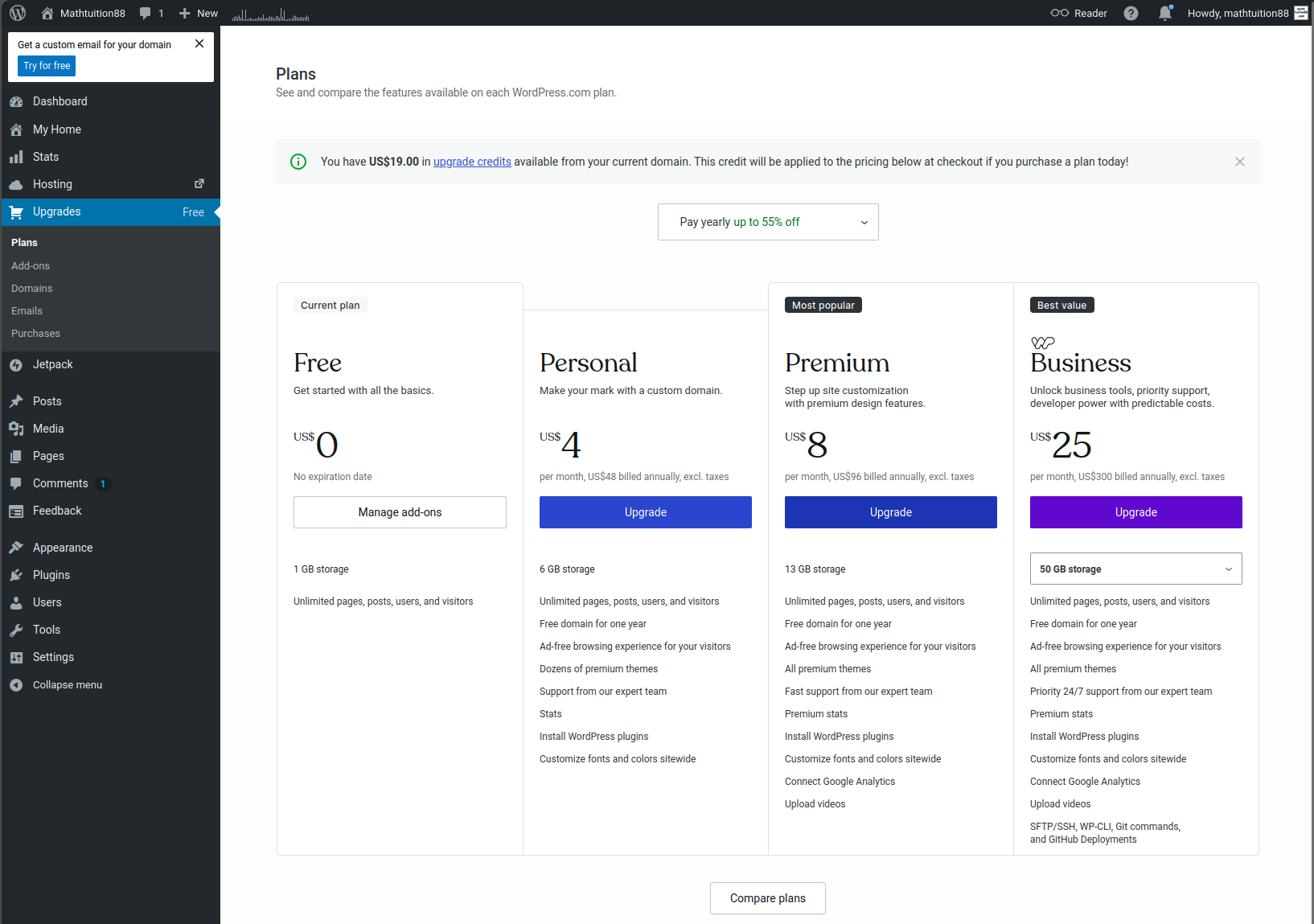
Wide variety of plans on WordPress.com suitable for bloggers of all levels

Introduction: Why Start a Math Education Blog?

A mathematics blog can be a very useful long-term project.

For a tutor, it can show teaching ability and help parents understand your approach. For a teacher, it can become a place to share notes, reflections, and resources. For a student, it can become a learning portfolio. For an education blogger, it can become a library of explanations that continues helping readers over time.

Mathematics is especially suitable for blogging because many topics are evergreen. A good explanation of fractions, algebra, geometry, probability, calculus, or statistics can remain useful for years.

The difficulty is not usually the idea. Many educators already have plenty of things to write about. The difficulty is starting the website and maintaining it consistently.

That is why I tested WordPress.com from the perspective of someone building a simple education blog. I wanted to see whether a tutor or teacher could use it to create a clear, useful, and professional website without spending too much time on technical setup.

This article is a practical walkthrough. It is not only a general review. I will explain how I would set up a mathematics education blog on WordPress.com, what pages I would create, how I would organize the content, and what trade-offs to consider.

Step 1: Decide the Purpose of the Blog

Before choosing a design or writing the first post, it is important to decide what the blog is for.

A math education blog can have different purposes. It may be:

  • A tuition website
  • A mathematics resource library
  • A teacher’s reflection blog
  • A student learning portfolio
  • A parent guidance site
  • A collection of exam tips
  • A personal academic website

The purpose affects the structure.

For example, a tutor’s website should probably have a homepage, About page, contact page, and blog. A student portfolio may need project pages and learning reflections. A teacher’s blog may focus more on resources and classroom ideas.

For Mathtuition88.com-style content, the purpose is educational publishing. The goal is to share useful mathematics and learning content with students, parents, and readers interested in education.

When I tested WordPress.com, I found it helpful to think of the website as a simple learning hub rather than a complicated business system.

The site does not need to do everything at the start. It only needs a clear beginning.

Step 2: Start with a Simple Site Structure

One common mistake is trying to build too many pages immediately.

For an education blog, I would start with five basic sections:

  1. Homepage
  2. Blog
  3. About
  4. Resources
  5. Contact

This is enough for most tutors and teachers at the beginning.

The homepage introduces the site and guides readers to the main content.

The blog contains articles and updates.

The About page explains who is behind the site and why readers should trust the content.

The Resources page collects useful links, notes, worksheets, book recommendations, or important posts.

The Contact page allows readers, parents, students, or collaborators to reach out.

Inside WordPress.com, this type of structure is straightforward to create. Pages and posts are separated clearly. Pages are better for stable information, while posts are better for articles.

This distinction is important for education sites.

For example, “About Dr William Wu” should be a page. “How to Avoid Careless Mistakes in Algebra” should be a post.

Step 3: Build a Clear Homepage

The homepage should not be too complicated.

For an education website, clarity is more important than decoration. A visitor should quickly understand what the site offers.

A good homepage for a math education blog can include:

  • A short introduction
  • The main topics covered
  • Links to recent articles
  • A short author bio
  • A link to resources
  • A contact button

When using WordPress.com, the block editor makes it possible to build this page section by section.

For example, the first section can introduce the site:

“Mathtuition88.com shares mathematics explanations, learning resources, exam tips, and reflections on education.”

Then the next section can list the main topics:

  • Mathematics explanations
  • Study tips
  • Exam preparation
  • Education technology
  • Learning reflections

This kind of homepage is simple but effective.

I would avoid adding too many moving parts. For a student or parent, the site should feel calm and trustworthy. A cluttered homepage may make the site look less serious.

Step 4: Create an About Page That Builds Trust

The About page is very important for education websites.

When readers visit a mathematics or tuition-related site, they want to know who is writing the content. This is especially true for parents and students.

A good About page should include:

  • Your name
  • Your educational background
  • Your teaching or subject experience
  • The purpose of the website
  • The kind of readers the site is for
  • A realistic statement of your teaching philosophy

For example, for Mathtuition88.com, it is relevant to mention my mathematics background, PhD training, teaching experience, and interest in education and technology.

However, the tone should not be arrogant. In education, credibility matters, but humility also matters. A good About page should make readers feel that the author is knowledgeable and sincere.

WordPress.com makes it easy to create this kind of static page. The editor is enough for writing a clean biography, adding sections, and linking to relevant parts of the site.

Step 5: Write the First Educational Blog Post

After the homepage and About page, the most important step is writing the first useful article.

Many people spend too long adjusting design before publishing any content. For an education blog, content is the real value.

A good first post should be specific. Avoid writing something too broad, such as “How to Be Good at Math.” That topic is too general.

Better first-post ideas include:

  • Why students make careless mistakes in algebra
  • How to revise mathematics effectively before an exam
  • Three common mistakes in solving quadratic equations
  • Why understanding is better than memorizing formulas
  • How to approach difficult word problems
  • What students should do after getting a math question wrong

These topics are concrete and useful.

Inside WordPress.com, the post editor is suitable for this type of writing. You can use headings to organize the article, lists to show steps, and images if you want to include diagrams or handwritten working.

For example, an article about careless mistakes could use this structure:

  1. Introduction
  2. Mistake 1: Not checking signs
  3. Mistake 2: Skipping steps mentally
  4. Mistake 3: Copying the question wrongly
  5. How to reduce mistakes
  6. Final advice

This kind of structure is easy to create in WordPress.com.

Step 6: Use Categories Carefully

Categories are important for long-term organization.

When a blog is new, categories may not seem important. But after you have written 50 or 100 articles, poor organization becomes a problem.

For a mathematics education blog, I would begin with broad categories such as:

  • Algebra
  • Geometry
  • Calculus
  • Statistics
  • Exam Tips
  • Study Skills
  • Education Reflections

Do not create too many categories too early. It is better to start simple.

Tags can be more specific. For example, a post in the Algebra category can have tags such as quadratic equations, factorisation, simultaneous equations, or careless mistakes.

WordPress.com supports both categories and tags, which is useful for education content. Students may search by topic, while parents may browse by theme.

A clean category structure also helps the site feel more professional.

Step 7: Add a Resources Page

A Resources page is especially useful for an education website.

This page can collect the most helpful materials in one place. It can include:

  • Recommended articles
  • Topic guides
  • Revision tips
  • Free worksheets
  • Useful books
  • External educational links
  • Study planning advice

For a math education blog, the Resources page can become a starting point for new readers.

Instead of asking readers to search through all blog posts, you can guide them to the most useful content.

For example, a Resources page could include sections such as:

  • Algebra resources
  • Calculus resources
  • Exam preparation
  • Study habits
  • Parent guides

Inside WordPress.com, this is easy to build with headings, lists, links, and short descriptions.

The Resources page does not need to be complete from day one. It can grow over time.

Step 8: Think About the Reader

A good education blog should always think about the reader.

For a mathematics site, there may be several types of readers:

  • Students who need help with concepts
  • Parents who want guidance
  • Teachers looking for ideas
  • Tutors comparing approaches
  • Lifelong learners interested in mathematics
  • Students building confidence after struggling

Each reader has different needs.

A student may want a clear example. A parent may want reassurance and practical advice. A teacher may want deeper reflection. A tutor may want teaching strategies.

This affects writing style.

For Mathtuition88.com, I would keep the tone clear, patient, and practical. Mathematics can already feel intimidating to many students. The writing should reduce confusion, not increase it.

WordPress.com helps by giving a clean publishing environment, but the author still needs to write with the reader in mind.

Step 9: Keep the Design Simple

Education websites do not need excessive design.

A good design should make reading easier. It should not compete with the content.

For a math blog, I would prioritize:

  • Clear fonts
  • Good spacing
  • Simple navigation
  • Mobile readability
  • Fast access to articles
  • Easy-to-find About and Contact pages

WordPress.com themes and editor tools make it possible to create a clean site without hiring a designer. The main point is to avoid overcomplication.

For mathematics content, readability is especially important. Long paragraphs can be tiring. Headings, examples, and short sections help readers stay focused.

Students often visit educational sites when they are already confused. A messy website makes the problem worse.

A clean design supports learning.

Step 10: Understand the Pricing

According to the campaign brief, the current WordPress.com pricing is:

  • Personal: $9/month monthly or $4/month annually
  • Premium: $18/month monthly or $8/month annually
  • Business: $25/month monthly or $25/month annually
  • Commerce: $45/month monthly or $45/month annually

For a simple education blog, I would first consider the Personal plan.

The Personal plan is suitable if you mainly want a custom domain and a professional place to publish articles.

The Premium plan may be useful if you want more design options, monetization features, or a more polished website.

The Business plan may become relevant if the site grows and needs more advanced features.

The Commerce plan is mainly for selling products or services online. A tutor or education blogger may not need this at the beginning unless the site is used to sell courses, worksheets, books, or digital products.

My advice is to choose based on actual needs. A beginning education blog does not need to start with the most expensive plan.

What I Liked About Using WordPress.com

The main thing I liked is that WordPress.com lowers the barrier to publishing.

This is important because many educators have useful knowledge but never turn it into a website. The technical setup becomes a blocker.

WordPress.com helps by handling hosting, updates, and security, so the website owner can focus more on the site itself.

I also liked that posts and pages are organized clearly. For an education blog, this matters because content grows over time.

The editor is also practical for educational writing. Headings, lists, images, and tables are enough for many articles.

Another strength is that the platform suits both beginners and serious bloggers. You can start with a simple site and improve it gradually.

For education, that is often the best approach. Start small, publish consistently, and improve the structure over time.

Limitations and Trade-Offs

WordPress.com is not perfect.

The first limitation is that it is more managed than self-hosted WordPress.org. This is good for simplicity, but users who want full technical control may prefer WordPress.org.

The second limitation is that the editor takes some time to learn. It is easier than building a site manually, but beginners still need to understand blocks, pages, posts, menus, categories, and settings.

The third limitation is that more complex education businesses should check features carefully. A simple blog is easy. A full online learning platform with student logins, memberships, payment systems, or course management may require more advanced planning.

The fourth limitation is that WordPress.com can help you build the site, but it cannot replace the educational quality of the writing. The platform is only the tool. The real value still comes from clear explanations and genuine teaching insight.

A Practical Publishing Plan

For someone starting a math education blog, I would suggest a simple first-month plan.

In the first week, create the homepage, About page, and Contact page.

In the second week, publish two useful articles.

In the third week, create a Resources page and organize your categories.

In the fourth week, publish two more articles and improve internal links between related posts.

This is enough to create momentum.

Do not wait until the website is perfect. Education blogs become valuable through consistent publishing.

A simple site with ten useful articles is better than a beautiful site with no content.

Example Article Ideas for a Math Blog

Here are some topics that would fit a mathematics education blog:

  • How to avoid careless mistakes in mathematics
  • Why algebra is difficult for many students
  • How to revise for mathematics exams
  • The difference between understanding and memorizing
  • How to use worked examples properly
  • Why students should write full solutions
  • Common mistakes in differentiation
  • How to approach probability questions
  • What parents should know about math tuition
  • How to build confidence in mathematics

These topics are useful because they come from real educational problems.

A good education blog should not only chase keywords. It should answer real questions from students and parents.

Why Blogging Still Matters in Education

Some people may wonder whether blogging is still useful when social media and short videos are so popular.

I think blogging still matters, especially for education.

A short video can introduce an idea quickly, but a blog post can explain it carefully. A blog post can be searched, bookmarked, linked, updated, and organized.

For mathematics, written explanations are still very powerful. Students can read at their own pace, review steps, and return to the article later.

A blog also gives the educator more control. Social media platforms change their algorithms often. A website is a more stable long-term asset.

WordPress.com is useful because it gives educators a practical way to build that asset without too much technical burden.

Final Verdict

Starting a math education blog does not need to be complicated.

The most important things are clear purpose, useful content, good organization, and consistent publishing.

WordPress.com supports these goals well. It handles much of the technical side, gives you a proper publishing system, and allows you to create pages, posts, categories, and resources in a structured way.

For tutors, teachers, students, and education bloggers, I think WordPress.com is a strong option if the goal is to build a simple and trustworthy education website.

It may not be the best choice for users who want full technical control or complex custom systems. But for a practical education blog, it does the job well.

My main takeaway is this:

A good education blog should make learning clearer. A good website platform should make publishing easier. WordPress.com helps with the second part, so educators can focus more on the first.

Author Bio

William is the founder of Mathtuition88.com, an education and mathematics blog that shares mathematics explanations, learning resources, exam-related content, and reflections on learning. He has experience in teaching, mathematical research, and technical blogging.

WordPress.com vs WordPress.org for Education Blogs: Which Is Better for Teachers and Tutors?

WordPress.com vs WordPress.org for Education Blogs: Which Is Better for Teachers and Tutors?

Affiliate disclosure: This article contains affiliate links to WordPress.com. If you sign up through my link, I may receive a commission at no extra cost to you. I only recommend tools that I have personally tested and that I think may be useful for educators, tutors, bloggers, and small website owners.

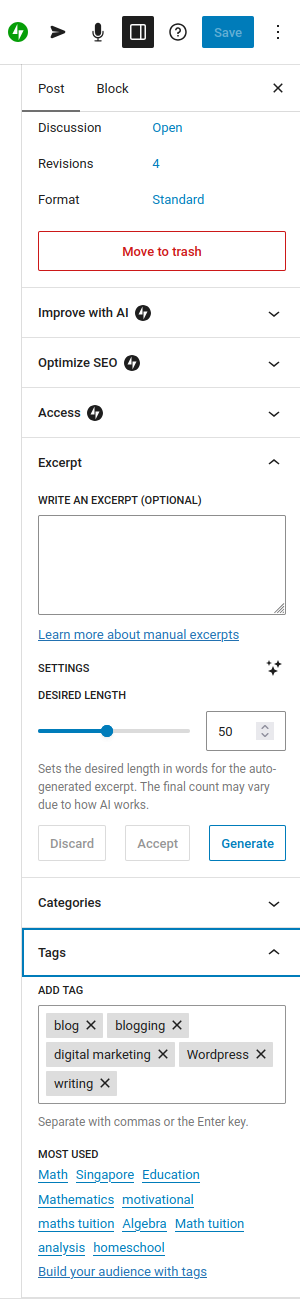
Easy tag management with WordPress.com

Introduction

Many teachers, tutors, and education bloggers eventually face the same question:

Should I use WordPress.com or WordPress.org for my education website?

The names are similar, but the experience is quite different.

WordPress.com is a managed website platform. Hosting, software updates, security, and much of the technical maintenance are handled for you.

WordPress.org is the open-source WordPress software that you install on your own web hosting. It gives you more control, but it also gives you more responsibility.

For an education website, this choice matters. A tutor or teacher usually does not build a website just for decoration. The website needs to support real educational work: articles, resources, contact pages, exam tips, student notes, parent guidance, and perhaps a long-term content library.

I tested WordPress.com from this practical education-blogging perspective. I wanted to see whether it could support the type of site a mathematics tutor, teacher, or academic blogger might want to build.

This article compares WordPress.com and WordPress.org specifically for education blogs, tuition websites, and learning-resource sites.

The Simple Difference

The simplest way to explain the difference is this:

WordPress.com is like moving into a managed apartment. The main facilities are already handled. You can focus on arranging the rooms, decorating, and living there.

WordPress.org is like owning and renovating your own house. You have more freedom, but you are also responsible for more maintenance.

Both can be good. The better choice depends on what you need.

For a mathematics tutor who wants to publish weekly articles and maintain a professional website, WordPress.com may be enough.

For a developer or advanced website owner who wants full control over hosting, plugins, server configuration, and custom code, WordPress.org may be more attractive.

The key is not which one is “better” in general. The key is which one is better for your actual use case.

Why This Matters for Education Websites

Education websites have different needs from ordinary brochure websites.

A simple company website may have five pages and rarely change. An education blog may grow every week. Over time, it may contain hundreds of articles.

For example, a mathematics education site may include:

  • Algebra explanations
  • Calculus notes
  • Geometry diagrams
  • Probability examples
  • Exam strategy articles
  • Study tips
  • Parent guidance
  • Book recommendations
  • Teaching reflections
  • AI and education discussions

This means the platform must be good for publishing, organizing, editing, and maintaining content.

A good education site also needs trust. Students and parents want to know that the content is written by someone with relevant experience. The site should look clear, stable, and professional.

That is why WordPress remains a strong option for education blogging. It is not only a page builder. It is a content management system.

The question is whether to use the managed version, WordPress.com, or the self-hosted version, WordPress.org.

My Hands-On Impression of WordPress.com

When I tested WordPress.com, the main thing I noticed was that it reduces setup friction.

I did not need to begin by choosing a hosting provider, installing WordPress manually, configuring SSL, or checking server settings. The platform guided me toward creating the site and editing the actual content.

For an educator, this is valuable. Most teachers and tutors are already busy. If the technical setup is too heavy, the website may never become active.

Inside WordPress.com, the dashboard gave me access to the main areas I expected: posts, pages, media, design, and site settings. The editor used a block-based approach, where I could add headings, paragraphs, images, lists, buttons, and other sections.

For an education blog, this is practical. Most educational articles need structure more than fancy effects.

A mathematics article, for example, often needs:

  • A clear title
  • Section headings
  • Definitions
  • Step-by-step explanation
  • Examples
  • Common mistakes
  • Summary
  • Links to related topics

The WordPress.com editor supports this kind of article well.

Building an Education Site Structure

A good education blog should not be only a list of random posts. It should have a clear structure.

In my test, I considered a simple site structure suitable for a teacher or tutor:

  • Homepage
  • About page
  • Blog page
  • Resources page
  • Contact page
  • Categories for major subjects

This is enough for many education websites.

The homepage introduces the site. The About page builds trust. The Blog page contains articles. The Resources page collects useful links or materials. The Contact page allows students, parents, or readers to reach out.

For Mathtuition88.com-style content, the blog is especially important because the value of the site comes from mathematics and education articles. A clean structure helps readers find useful material.

WordPress.com made this kind of structure easy to set up. I could create pages, draft posts, and think about navigation without dealing with backend hosting tasks.

This is where WordPress.com has a clear advantage for beginners.

Where WordPress.com Is Stronger

WordPress.com is stronger when simplicity and maintenance matter more than maximum control.

For many educators, that is exactly the situation.

A teacher may want to share lesson reflections. A tutor may want to publish exam tips. A student may want to create a learning portfolio. A small education business may want a professional web presence.

In these cases, the website owner may not want to spend time managing technical details.

The main strengths of WordPress.com are:

  • Hosting is included
  • Security is handled by the platform
  • Software updates are managed
  • The setup process is beginner-friendly
  • The editor is suitable for regular publishing
  • Posts and pages are organized naturally
  • The platform is suitable for long-term blogging

This is helpful because education content requires consistency. If the platform is too troublesome, publishing slows down.

A tutor who writes one helpful article per week for two years will build a valuable resource library. But that only happens if the publishing workflow is sustainable.

WordPress.com is good for making the workflow sustainable.

Where WordPress.org Is Stronger

WordPress.org is stronger when flexibility and control matter more than convenience.

With self-hosted WordPress, you choose your own hosting provider. You can install many types of plugins, customize more deeply, and access more technical settings.

This can be very powerful.

For example, a more advanced education website may need:

  • Complex membership features
  • Student login systems
  • Learning management systems
  • Advanced course structures
  • Custom payment flows
  • Special plugin combinations
  • Developer-level customization
  • Full control over backups and hosting

In such cases, WordPress.org may be the better long-term option.

However, more control also means more responsibility.

You may need to think about hosting quality, plugin compatibility, updates, security, backups, performance, and troubleshooting. If something breaks, you may need to fix it yourself or hire someone.

For a technical person, this may be acceptable. For a busy educator, it may be a burden.

Pricing Considerations

According to the campaign brief, the current WordPress.com pricing is:

  • Personal: $9/month monthly or $4/month annually
  • Premium: $18/month monthly or $8/month annually
  • Business: $25/month monthly or $25/month annually
  • Commerce: $45/month monthly or $45/month annually

For an education blog, the Personal and Premium plans are usually the first plans to consider.

The Personal plan is suitable for a simple education blog, personal academic website, or tutor site. If you mainly need a custom domain and a professional place to publish content, this may be enough to start.

The Premium plan may be useful if you want more design options, monetization features, or a more polished creator-style site.

The Business plan becomes more relevant if your education site needs more advanced features, plugin support, or business tools.

The Commerce plan is mainly for online selling. It may be useful if you want to sell courses, digital products, books, worksheets, or other educational materials directly from the site.

With WordPress.org, the pricing is different. The software itself is free, but you still need to pay for hosting, a domain name, possibly premium themes, possibly premium plugins, and sometimes technical support.

So the comparison is not simply “WordPress.org is free and WordPress.com is paid.” In real life, both can cost money. The difference is how the cost is packaged and how much technical work you want to handle yourself.

Which Is Better for a Math Tutor?

For a math tutor who wants a simple professional website, I would usually lean toward WordPress.com.

A tutor typically needs:

  • A homepage
  • An About page
  • A blog
  • A contact page
  • A few pages explaining teaching areas
  • A custom domain
  • A clean design
  • Reliable hosting

WordPress.com can support this well.

The tutor can focus on writing useful articles, such as:

  • Common mistakes in algebra
  • How to prepare for exams
  • Why students struggle with word problems
  • How to improve problem-solving ability
  • Differences between memorizing formulas and understanding concepts

These articles can build trust over time.

If the tutor later wants advanced systems such as student accounts, online course management, or complex payment flows, then it may be worth evaluating WordPress.org or a higher WordPress.com plan.

But for starting and maintaining a serious content-based tutor website, WordPress.com is a practical option.

Which Is Better for a Teacher?

For a teacher who wants to share notes, reflections, and resources, WordPress.com is also attractive.

A teacher may not need a complicated business website. The main need may be publishing.

For example, a teacher could use WordPress.com to write:

  • Reflections on teaching methods
  • Study guides for students
  • Topic summaries
  • Reading lists
  • Commentary on education trends
  • Personal learning notes

The managed nature of WordPress.com is useful here. The teacher can spend more time writing and less time maintaining the technical environment.

However, if the teacher wants a highly customized learning platform with logins, quizzes, restricted content, and advanced course features, then WordPress.org or another learning management system may be more appropriate.

Which Is Better for a Student Portfolio?

For students, I would also consider WordPress.com a good starting point.

A student portfolio does not usually need advanced technical features. It needs to be clear, organized, and easy to update.

A student interested in mathematics, science, computer science, or AI could publish:

  • Project writeups
  • Competition reflections
  • Book notes
  • Research summaries
  • Learning journals
  • Personal essays
  • Portfolio pages

This can be very helpful for developing communication skills.

In mathematics and science, being able to explain clearly is valuable. A student who regularly writes about what they learn may develop deeper understanding.

WordPress.com is suitable for this because it reduces technical obstacles.

Which Is Better for a Large Education Business?

For a larger education business, the answer depends on complexity.

If the business only needs a marketing website plus blog, WordPress.com may still work well.

But if the business needs advanced features such as course sales, student dashboards, membership areas, booking systems, payment integrations, and custom workflows, then the decision requires more careful planning.

In that case, WordPress.org may offer more flexibility. However, the business must also be ready to handle technical maintenance or hire someone who can.

This is the trade-off.

WordPress.com gives convenience and managed infrastructure. WordPress.org gives control and responsibility.

SEO and Education Content

Search engine visibility matters for education websites because students and parents often search for specific questions.

Examples include:

  • How to solve simultaneous equations
  • O Level mathematics revision tips
  • Difference between permutations and combinations
  • How to study calculus
  • Best way to revise for exams
  • Why students make careless mistakes in math

WordPress.com gives a good foundation for publishing search-friendly content. You can use proper headings, titles, categories, tags, internal links, and clear article structure.

However, SEO should not be treated as merely a technical trick.

For education content, the most important thing is usefulness. A teacher or tutor with real experience can often write better explanations than a generic content writer because they know where students struggle.

That is the real advantage.

For example, a generic article might say, “Practice more questions to improve your math.”

A more experienced educator might say, “Many students do not lose marks because they lack effort. They lose marks because they skip the checking step after solving, especially when negative signs and fractions are involved.”

The second explanation is more useful because it comes from real teaching insight.

Whether you use WordPress.com or WordPress.org, the quality of the educational content remains the main factor.

Trust and Credibility

For an education website, trust is not optional.

Readers want to know who is writing the content. This is especially true when the topic is education, tuition, or academic guidance.

A good education blog should include:

  • A named author
  • A clear bio
  • Relevant experience
  • Honest writing
  • Accurate information
  • Contact information
  • Transparent disclosures if affiliate links are used

WordPress.com can provide the platform, but the author must provide the credibility.

This is why an About page is important. It should not be hidden. Students and parents should be able to understand who is behind the website.

For a mathematics site, it is also important to avoid exaggerated claims. Good education content should be confident but not unrealistic. It should not promise instant results. Learning takes effort, time, and good guidance.

Honest Limitations

The main limitation of WordPress.com is that it may not satisfy users who want full technical control.

If you are comfortable managing hosting, installing plugins, editing code, and troubleshooting technical issues, you may find WordPress.org more flexible.

Another limitation is that the WordPress.com editor still requires some learning. It is easier than managing a full self-hosted setup, but beginners still need to understand pages, posts, blocks, menus, categories, tags, and site settings.

A third limitation is that complex education businesses should check plan features carefully. A simple blog is easy. A full online learning platform is more complicated.

Finally, no website platform can replace educational substance. A well-designed website with weak content will not become useful simply because it looks professional.

For education blogs, the content must be clear, accurate, and genuinely helpful.

My Recommendation

For most individual educators, tutors, and students, I would recommend starting with WordPress.com.

The reason is simple: it helps you publish.

If your main goal is to write useful mathematics explanations, share study resources, or build a professional education presence, WordPress.com removes many distractions.

You can always evaluate more advanced options later if your site becomes larger or more complex.

For advanced users, developers, or larger education businesses, WordPress.org may still be better because it gives more control.

So my practical recommendation is:

  • Choose WordPress.com if you want simplicity, managed hosting, and a smoother publishing workflow.
  • Choose WordPress.org if you want maximum control and are willing to manage the technical side.
  • Choose carefully if you are building a complex education business with memberships, courses, payments, or custom systems.

Final Verdict

WordPress.com and WordPress.org are both useful, but they serve different types of users.

For a math tutor, teacher, student, or education blogger, WordPress.com is often the more practical starting point. It allows you to build a clean website, publish articles, organize resources, and focus on teaching rather than technical maintenance.

WordPress.org is more powerful for advanced customization, but that power comes with extra responsibility.

For an education website, the best platform is the one that helps you publish consistently and serve readers well.

A mathematics blog does not need to be technically complicated to be valuable. It needs clear explanations, good organization, credibility, and regular updates.

From that perspective, WordPress.com is a strong choice for many education bloggers.

If your goal is to build a serious education site without spending too much time on hosting and maintenance, WordPress.com is worth considering.

Author Bio

William is the founder of Mathtuition88.com, an education and mathematics blog that shares mathematics explanations, learning resources, exam-related content, and reflections on learning. He has experience in teaching, mathematical research, and technical blogging.

WordPress.com for Math Tutors and Education Bloggers: A Hands-On Review

WordPress.com for Math Tutors and Education Bloggers: A Hands-On Review

Affiliate disclosure: This article contains affiliate links to WordPress.com. If you sign up through my link, I may receive a commission at no extra cost to you. This does not affect the price you pay. I only recommend platforms that I have personally tested and that I think may be useful for educators, tutors, bloggers, or small website owners.

WordPress.com Dashboard Screenshot: Easy Content Management for Bloggers

Why a Math Tutor or Education Blogger Needs a Website

For a mathematics tutor, teacher, or education blogger, a website is more than an online name card.

It can become a long-term library of useful explanations, study tips, exam notes, and learning resources. Unlike social media posts, which disappear quickly into a feed, a good blog post can continue helping students and parents for years.

This is especially true for mathematics. A clear explanation of algebra, calculus, probability, trigonometry, or problem-solving techniques does not become useless after one week. In fact, some of the most valuable education content is evergreen. Students search for the same concepts again and again because the core difficulties remain similar across generations.

That is why I wanted to test WordPress.com from the perspective of an educator.

The question is not simply whether WordPress.com can create a nice-looking website. Many platforms can do that.

The more important question is:

Can WordPress.com help a math tutor, teacher, or education blogger build a trustworthy and useful website without being distracted by too much technical maintenance?

After testing the platform, I think the answer is yes, especially for educators who want to focus on writing and teaching rather than hosting, updates, security, and backend configuration.

What I Tested

For this review, I looked at WordPress.com as if I were setting up a small education website for a math tutor or education blogger.

The site structure I tested was simple and realistic:

  • A homepage introducing the education site
  • A blog section for mathematics and study articles
  • A resources page for students
  • An About page for author credibility
  • A Contact page for enquiries
  • Categories for different education topics

This is the kind of website many tutors, teachers, and education writers actually need. Most do not need a complicated custom web application. They need a clean, reliable publishing platform that can present useful content professionally.

I focused on the parts that matter most for education websites:

  • How easy it is to create pages
  • How comfortable the editor feels for writing educational content
  • Whether posts can be organized clearly
  • Whether the site can look credible to parents and students
  • Whether the platform reduces technical burden
  • What limitations educators should be aware of

First Impression: WordPress.com Feels Designed for Publishing

The first thing I noticed is that WordPress.com still feels like a publishing platform at its core.

This is important.

Some website builders are good at creating attractive landing pages, but they feel less natural when you want to publish many articles over time. For education websites, publishing is usually the main activity.

A tutor may want to write about exam strategies. A teacher may want to share revision notes. A mathematics blogger may want to publish worked examples. A parent-focused education site may want to write articles comparing different learning approaches.

These are not one-page website tasks. They require a content system.

WordPress.com gives you posts, pages, categories, tags, media, menus, and site settings in one place. That makes it suitable for building an education content library.

For example, a math education blog could organize posts into categories such as:

  • Algebra
  • Geometry
  • Calculus
  • Statistics
  • Probability
  • Study Tips
  • Exam Preparation
  • Learning Mindset
  • Education Technology

This is useful because students and parents usually arrive with a specific need. A student may search for probability notes. A parent may search for tuition advice. A teacher may look for teaching resources. Good organization helps each reader find the right content faster.

Creating the Homepage

The homepage of an education website should be clear, calm, and trustworthy.

For a tutoring or mathematics education site, I would avoid making the homepage too flashy. The reader is usually not looking for entertainment. The reader wants confidence.

A good homepage should answer a few basic questions:

  • What does this site teach?
  • Who is behind it?
  • What resources are available?
  • Is the information reliable?
  • Where should the reader go next?

In WordPress.com, I tested a simple homepage structure using the block editor. I created sections for an introduction, featured topics, latest articles, and a short author profile.

The block editor made this fairly easy. I could add headings, paragraphs, lists, buttons, and page sections without touching code.

For an education website, this is enough for a strong basic homepage. You do not need an overly complicated design. A clean page with good structure is often better than a visually crowded one.

For example, a math tutor’s homepage could include:

  • A short introduction to the tutor
  • The levels or subjects taught
  • Links to recent articles
  • A section for free resources
  • A contact button
  • A brief explanation of teaching philosophy

For Mathtuition88.com-style content, I would focus on clarity and usefulness. The homepage should guide readers toward mathematics resources, not distract them with unnecessary design effects.

Writing a Mathematics Blog Post

The most important test was writing an educational blog post.

A mathematics blog post is different from a lifestyle blog post. It often needs structure. It may include definitions, formulas, examples, diagrams, step-by-step explanations, and warnings about common mistakes.

In WordPress.com, the editor is based on blocks. At first, this may feel slightly different from writing in a normal document editor, but it becomes natural after some practice.

For an educational post, I found the following blocks most useful:

  • Headings for organizing ideas
  • Paragraphs for explanation
  • Lists for step-by-step methods
  • Images for diagrams or handwritten workings
  • Tables for comparison
  • Quotes for important reminders
  • Buttons for linking to related resources

A typical mathematics article might be structured like this:

  1. Introduce the topic
  2. Explain why students find it difficult
  3. Give the key formula or idea
  4. Work through an example
  5. Show a common mistake
  6. Give a final summary

This format works well inside the WordPress.com editor.

For example, if I were writing an article on quadratic equations, I could use headings such as:

  • What is a quadratic equation?
  • Method 1: Factorisation
  • Method 2: Completing the square
  • Method 3: Quadratic formula
  • Common mistakes
  • Practice questions

The block editor supports this kind of structured writing. It also makes it easy to preview the post before publishing, which is helpful because educational content should be readable on both desktop and mobile.

Many students now read on phones. A mathematics article that looks fine on a laptop may be unpleasant on a small screen if the paragraphs are too long or the formatting is too dense. WordPress.com’s preview function helps check this before publishing.

Organizing Content for Students and Parents

One of the strengths of WordPress.com is that it gives you a proper content system.

For an education site, organization matters because different readers have different needs.

A student may want:

  • Short explanations
  • Worked examples
  • Exam tips
  • Practice questions
  • Topic summaries

A parent may want:

  • Tuition advice
  • Information about learning habits
  • Guidance on choosing resources
  • Signs that a child may need help
  • Long-term education planning

A teacher or tutor may want:

  • Teaching reflections
  • Resource lists
  • Curriculum-related notes
  • Educational technology ideas

If all these articles are mixed together without structure, the site becomes difficult to use.

WordPress.com allows you to use categories and tags to organize content. For example, you can put a post under “Calculus” and tag it with “differentiation,” “exam tips,” and “common mistakes.”

This is very useful for long-term blogging.

A serious education site may eventually have hundreds of posts. Without categories and tags, readers may only see the latest posts and miss older useful articles. With good organization, older articles can remain discoverable.

For a mathematics blog, I would recommend creating a simple category structure early. Do not make too many categories at the start. Begin with broad topics, then use tags for more specific ideas.

For example:

  • Algebra
  • Geometry
  • Calculus
  • Statistics
  • Study Skills
  • Education Reflections

This is enough for a clean start.

Building Trust as an Educator

For education websites, trust is extremely important.

A reader may be a student preparing for exams. A parent may be looking for reliable guidance. A teacher may be checking whether the content is accurate.

WordPress.com helps with the technical side of publishing, but the trust still comes from the author.

That means an education site should include:

  • A clear author name
  • A short biography
  • Relevant qualifications or experience
  • Transparent contact information
  • Accurate and updated content
  • Honest explanations, not exaggerated claims

I think this is especially important for tuition-related websites. Parents are careful, and rightly so. They want to know who is behind the website and whether the person has real experience.

For Mathtuition88.com, an author bio is useful because it explains the background behind the content. A PhD in Mathematics, teaching experience, and long-term educational writing all help establish relevance.

But even without a PhD, an educator can still build trust by writing clearly, giving useful examples, and being honest about what the site provides.

A website should not overpromise. It should not say that every student will improve instantly. Education is more complex than that.

A trustworthy education site should sound calm, helpful, and realistic.

Pricing: Which WordPress.com Plan Makes Sense for Tutors?

According to the campaign brief, the current WordPress.com pricing is:

  • Personal: $9/month monthly or $4/month annually
  • Premium: $18/month monthly or $8/month annually
  • Business: $25/month monthly or $25/month annually
  • Commerce: $45/month monthly or $45/month annually

For a math tutor or education blogger, I would mainly compare the Personal, Premium, and Business plans.

The Personal plan is suitable for a simple education blog or tutor website. If your main goal is to publish articles, use a custom domain, and maintain a professional online presence, this may be enough to begin.

The Premium plan may be more suitable if you care about more design options, monetization, and a more polished creator-style site.

The Business plan may be worth considering if your education website becomes more serious commercially. For example, if you need more advanced features, plugins, integrations, or business tools, then Business may become relevant.

The Commerce plan is mainly for online selling. A typical tutor probably does not need this immediately unless the site is used to sell courses, digital products, books, worksheets, or other educational materials directly.

My practical advice is simple: do not choose the highest plan just because it sounds better. Choose based on what the site actually needs.

A tutor who only wants a homepage, blog, About page, and Contact page may not need Commerce. A larger education business with products and advanced workflows may need more.

What I Liked About WordPress.com

The first thing I liked is that WordPress.com reduces technical distractions.

For an educator, this is probably the biggest advantage. You do not need to start by comparing hosting providers, installing WordPress manually, configuring SSL, or worrying about basic maintenance.

The second thing I liked is that it supports long-form writing. This matters because education content often requires explanation. A short social media post is not always enough to teach a concept properly.

The third thing I liked is the content organization. Posts, pages, categories, and tags make sense for education websites.

The fourth thing I liked is that the platform is beginner-friendly but not too limited for serious blogging. A tutor can start simply and improve the site over time.

The fifth thing I liked is that WordPress.com is suitable for evergreen content. A good math explanation can remain useful for years, and WordPress.com gives it a stable home.

Limitations and Trade-Offs

WordPress.com is useful, but it is not perfect.

The main limitation is that it is more managed than self-hosted WordPress.org. This is good for simplicity, but it means advanced users may feel some restrictions.

If you want full server control, custom backend logic, complex plugin configurations, or developer-level freedom, self-hosted WordPress.org may be more suitable.

The second limitation is that the editor has a learning curve. It is not very difficult, but a new user still needs to understand blocks, pages, posts, templates, menus, and site settings.

The third limitation is that education businesses with complex needs should plan carefully. For example, if you want student accounts, paid memberships, online course systems, digital downloads, or booking integrations, you should check which WordPress.com plan supports the features you need.

The fourth limitation is that WordPress.com gives you the platform, but it does not create the educational value for you. The quality still depends on the author. A clean website cannot compensate for weak explanations or inaccurate content.

This is an important point. For education sites, content quality matters more than design.

WordPress.com for SEO and Long-Term Education Content

Many education bloggers care about search traffic. This is understandable because students and parents often use Google to search for specific topics.

A mathematics article may get traffic from searches such as:

  • How to solve quadratic equations
  • Difference between permutation and combination
  • How to study for O Level math
  • Common mistakes in calculus
  • Why is algebra difficult?

WordPress.com is useful because it gives you a blogging structure that search engines can understand. You can write proper titles, headings, categories, and internal links.

However, SEO should not become the only goal. For education content, the main goal should be helping the reader.

A good education article should be accurate, clear, and useful. It should answer the question better than a generic article. It should include real explanation, not just keywords.

This is where educators have an advantage. A real teacher or tutor understands the mistakes students make. That experience can make the article more helpful.

For example, an SEO-style article may say, “Practice regularly to improve math.” That is true but generic.

A teacher can write something more useful: “Many students lose marks not because they do not know the formula, but because they substitute values before checking the sign carefully.”

That kind of observation comes from real teaching experience. It is more valuable than generic advice.

Practical Use Cases for Tutors

Here are some practical ways a math tutor could use WordPress.com.

A tutor could create a blog explaining common exam topics. Each week, the tutor could publish one article on a specific concept, such as simultaneous equations, vectors, differentiation, or probability.

A tutor could create a parent guide section. These articles could discuss study habits, revision planning, exam stress, and how to support a child without creating too much pressure.

A tutor could create a resource page. This page could link to useful articles, practice materials, recommended books, or downloadable worksheets.

A tutor could create a credibility page. This could include the tutor’s background, teaching philosophy, qualifications, and approach.

A tutor could also use the website as a long-term portfolio. Over time, the blog itself becomes evidence of teaching ability. A tutor who has written 100 useful explanations has already shown commitment and expertise.

Practical Use Cases for Students

WordPress.com is not only useful for tutors. Students can also use it.

A student could create a learning portfolio. This is especially useful for older students, university students, or students applying for scholarships or internships.

For example, a student interested in mathematics, computer science, or AI could publish:

  • Notes from books
  • Project summaries
  • Problem-solving reflections
  • Competition experiences
  • Research explanations
  • Personal learning plans

This helps the student develop writing skills and also creates a visible record of learning.

In education, writing is thinking. When students explain what they learn, they often understand it better.

A simple WordPress.com site can become a learning journal, portfolio, and personal knowledge base.

My Final Verdict

After testing WordPress.com from the perspective of a math tutor and education blogger, I think it is a strong option for people who want to publish useful educational content without too much technical overhead.

Its biggest strength is that it lets you focus on the main task: writing and teaching.

For a math tutor, WordPress.com can support a professional website with articles, resources, an About page, and contact information.

For a teacher, it can become a place to share notes and reflections.

For a student, it can become a learning portfolio.

For an education blogger, it can become a long-term content library.

The platform is not perfect. Advanced users may want more control, and complex education businesses should check plan features carefully. But for many educators, the simplicity is a strength rather than a weakness.

A good education website does not need to be technically complicated. It needs to be clear, useful, trustworthy, and regularly updated.

WordPress.com helps with that.

If you are a tutor, teacher, student, or education blogger who wants to build a serious online presence, WordPress.com is worth considering — especially if your priority is to publish helpful content rather than manage website infrastructure.

Author Bio

William is the founder of Mathtuition88.com, an education and mathematics blog that shares mathematics explanations, learning resources, exam-related content, and reflections on learning. He has experience in teaching, mathematical research, and technical blogging.

I Built an Education Blog on WordPress.com — Here’s What I Found

I Built an Education Blog on WordPress.com — Here’s What I Found

Affiliate disclosure: This article contains affiliate links to WordPress.com. If you sign up through my link, I may receive a commission at no extra cost to you. I only recommend tools that I have personally tested and that I think may be useful for educators, tutors, bloggers, or small website owners.

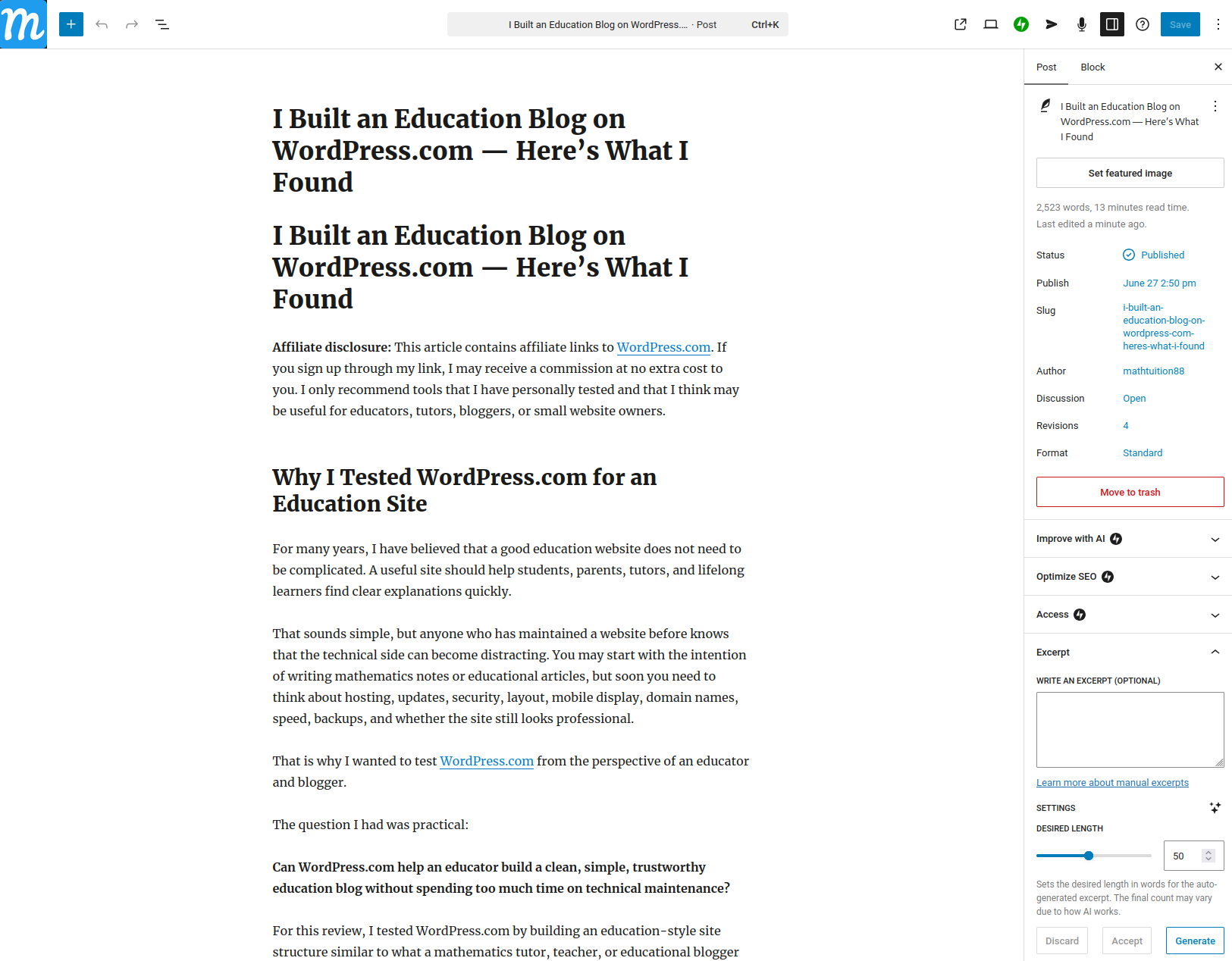
WordPress.com Clean Interface Screenshot

Why I Tested WordPress.com for an Education Site

For many years, I have believed that a good education website does not need to be complicated. A useful site should help students, parents, tutors, and lifelong learners find clear explanations quickly.

That sounds simple, but anyone who has maintained a website before knows that the technical side can become distracting. You may start with the intention of writing mathematics notes or educational articles, but soon you need to think about hosting, updates, security, layout, mobile display, domain names, speed, backups, and whether the site still looks professional.

That is why I wanted to test WordPress.com from the perspective of an educator and blogger.

The question I had was practical:

Can WordPress.com help an educator build a clean, simple, trustworthy education blog without spending too much time on technical maintenance?

For this review, I tested WordPress.com by building an education-style site structure similar to what a mathematics tutor, teacher, or educational blogger might need. I focused on a few realistic tasks:

  • Creating a homepage for an education blog
  • Setting up pages for learning resources
  • Writing a sample educational blog post
  • Testing the WordPress.com editor
  • Looking at how easy it is to organize content
  • Considering whether the platform is suitable for long-term educational publishing

My conclusion is that WordPress.com is especially useful for educators who want to publish consistently without turning website management into a second job.

It is not perfect, and I will discuss the trade-offs honestly. But for many education websites, tuition blogs, school-related resource sites, and personal academic blogs, WordPress.com is a practical option.

First Impression: The Setup Is Beginner-Friendly

The first thing I noticed is that WordPress.com feels more guided than a self-hosted WordPress installation.

With WordPress.org, you usually need to arrange your own hosting, install WordPress, connect the domain, handle SSL, manage updates, and think about security. This is powerful, but it can also be too much for a teacher or tutor who simply wants to publish learning materials.

WordPress.com is different because hosting is already part of the platform. You create an account, start a site, choose a design direction, and begin editing.

For an education website, this matters a lot.

Most educators are not trying to become web hosting experts. They want to write articles such as:

  • How to solve algebra questions
  • Common mistakes in calculus
  • Study tips for examinations
  • Notes for secondary school mathematics
  • Advice for parents choosing tuition
  • Reflections on learning and teaching
  • Resource lists for students

If the website setup is too troublesome, many people will give up before publishing their first ten articles. WordPress.com reduces that early friction.

The dashboard was also reasonably clear. The main areas I paid attention to were posts, pages, appearance, media, and site settings. These are the core areas an education blogger will use most often.

For a new tutor or teacher starting a site, I think the learning curve is manageable.

Building a Homepage for an Education Blog

For the homepage, I wanted something that would make sense for an education site.

A good education homepage should not be too flashy. It should quickly tell the reader:

  • What the site is about
  • Who the site is for
  • What type of content is available
  • Where to go next

In my test build, I structured the homepage around a simple educational purpose: helping students and readers find mathematics and learning resources.

The block editor made this fairly straightforward. I could add headings, paragraphs, buttons, lists, and page sections without writing code. This is helpful because many educators do not want to design every part of a website from scratch.

For example, a homepage for an education blog can include:

  • A short introduction to the site
  • A section for mathematics articles
  • A section for exam tips
  • A section for learning resources
  • A link to the latest blog posts
  • A short author or tutor profile

The block-based editing experience is suitable for this kind of structure. You can build the page piece by piece.

I especially like that the editor encourages a clean structure. Instead of treating a page as one long wall of text, you can break it into meaningful sections. This is important for education content because students and parents often scan before reading deeply.

For example, if a parent visits a tuition-related site, they may first look for credibility and relevant topics. If a student visits a mathematics blog, the student may want to quickly find a specific topic, such as trigonometry, probability, algebra, or calculus.

A structured homepage helps both types of readers.

Writing an Educational Blog Post

The most important test for me was the writing experience.

An education blog lives or dies by its posts. The design is important, but content is the real value. If the editor is unpleasant to use, the website owner may not publish consistently.

I tested the blog post editor by drafting a sample educational article in the style of Mathtuition88.com.

The WordPress.com editor uses blocks for paragraphs, headings, images, lists, quotes, and other content types. At first, this may feel different from a normal document editor, but it becomes natural after some use.

For an educational article, the most useful blocks are:

  • Heading blocks for sections
  • Paragraph blocks for explanations
  • List blocks for steps
  • Image blocks for diagrams or screenshots
  • Quote blocks for key points
  • Table blocks for comparisons
  • Button blocks for calls to action

This is enough for many education posts.

For example, a mathematics article may need the following structure:

  1. State the problem
  2. Explain the concept
  3. Show the method
  4. Work through the solution
  5. Highlight common mistakes
  6. Give a final takeaway

The editor supports this style well.

One thing I appreciate is that WordPress.com keeps the writing and publishing workflow inside one system. You can draft the post, preview it, add categories, add tags, and publish from the same place.

For an education blog, categories and tags are useful. You can organize articles by topic, such as:

  • Algebra
  • Geometry
  • Calculus
  • Statistics
  • Study tips
  • Exam preparation
  • Education technology
  • AI and learning

This kind of organization becomes more important as the site grows. A blog with ten posts is easy to manage. A blog with hundreds of posts needs structure.

Why WordPress.com Makes Sense for Educators

From an educator’s perspective, the biggest advantage of WordPress.com is that it lets you focus on publishing.

A mathematics tutor, for example, may not need a complicated website. The tutor may need:

  • A professional homepage
  • A blog for educational articles
  • A contact page
  • A few pages explaining services
  • A resource section for students
  • A custom domain
  • Basic security and hosting handled

WordPress.com fits this use case well.

It is also suitable for teachers or academics who want a personal website. A university lecturer, school teacher, or independent educator may want to share notes, reflections, or research summaries without managing technical infrastructure.

The platform is also useful for long-term content building. Education content can remain valuable for many years. A good explanation of algebra, calculus, or probability does not expire quickly. If you build a library of useful articles, your website can become a long-term educational asset.

This is one reason I still like blogging as a medium. Social media posts disappear quickly. A good blog post can continue helping readers years later.

WordPress.com vs Self-Hosted WordPress for an Education Blog

Many people are confused by the difference between WordPress.com and WordPress.org.

The simple explanation is this:

WordPress.com is a managed platform where hosting is included.
WordPress.org is the open-source WordPress software that you install on your own hosting.

For an educator, the choice depends on how much control you want and how much technical responsibility you are willing to take.

Self-hosted WordPress gives you more control. You can choose your hosting provider, install many plugins, customize more deeply, and manage the technical environment yourself. This is attractive for advanced users.

WordPress.com is more managed. Hosting, security, and updates are handled for you. This is attractive if your main goal is to publish educational content rather than manage a website backend.

For a serious developer, self-hosted WordPress may feel more flexible. For a busy teacher or tutor, WordPress.com may feel more practical.

Personally, I think many education bloggers should start by asking this question:

Do I want to spend more time writing educational content, or more time managing website infrastructure?

If the answer is writing, WordPress.com deserves consideration.

Pricing: Which Plan Should an Education Blogger Consider?

According to the campaign brief, the current WordPress.com pricing is:

  • Personal: $9/month monthly or $4/month annually
  • Premium: $18/month monthly or $8/month annually
  • Business: $25/month monthly or $25/month annually
  • Commerce: $45/month monthly or $45/month annually

For an education blog, I would first look at the Personal and Premium plans.

The Personal plan is the most natural starting point for a simple education blog. It gives you a cleaner, more professional setup than a free site and is suitable if your main goal is to publish articles under your own domain.

The Premium plan may be worth considering if you want more design flexibility, monetization options, or more advanced site features.

The Business plan may make sense if the education site becomes more than a blog. For example, if you want more advanced plugins, business tools, or a more customized website, then Business becomes more relevant.

The Commerce plan is mainly for online stores. Most education bloggers do not need this at the start unless they are selling products, courses, digital downloads, or other items directly through the website.

For a mathematics education blog, I would not start with the most expensive plan unless there is a clear need. It is better to begin with the plan that matches the actual purpose of the site.

What I Liked

The first thing I liked is that WordPress.com removes much of the technical burden.

For educators, this is important. A teacher or tutor may have good knowledge to share but limited time to handle hosting, security, software updates, and technical troubleshooting.

The second thing I liked is the writing experience. The block editor is flexible enough for educational posts, especially posts that use headings, steps, examples, and explanations.

The third thing I liked is that WordPress.com is still built around publishing. Some website builders are good for simple landing pages but less ideal for long-term blogging. WordPress.com feels more suitable for building a content library over time.

The fourth thing I liked is that the platform can grow with the user. A beginner can start with simple posts and pages. Later, the site can become more polished, organized, and feature-rich.

The fifth thing I liked is that it encourages proper site structure. Pages, posts, categories, tags, menus, and media are all part of the system. This is very useful for education content because organization matters.

Limitations and Trade-Offs

The main limitation is that WordPress.com is more managed than self-hosted WordPress.

This is good for simplicity, but it also means that users who want deep technical control may prefer WordPress.org. If you want to manage your own server, customize everything freely, or build a highly specialized technical setup, self-hosted WordPress may be better.

The second trade-off is that the editor takes time to learn. It is not difficult, but beginners still need to understand blocks, page settings, templates, menus, and site styles. A first-time user may need to experiment for a while before feeling fully comfortable.

The third trade-off is pricing. WordPress.com has different plans, and users should check carefully which features are included in each plan. Do not choose a plan only based on price. Choose based on what your site actually needs.

The fourth limitation is that a simple education blog is easy to build, but a complex education business may need more planning. For example, if you want student login areas, advanced course management, payment flows, memberships, or custom learning systems, you should compare the available plan features carefully before committing.

In short, WordPress.com is convenient, but convenience always comes with some structure.

Who Should Use WordPress.com?

Based on my test, I think WordPress.com is suitable for:

  • Mathematics tutors starting a blog
  • Teachers sharing learning resources
  • Education writers building a content site
  • Academics creating a personal website
  • Students building a portfolio
  • Small education businesses needing a simple web presence
  • Bloggers who want to focus on writing rather than technical maintenance

It is especially suitable for people who want a clean and reliable publishing platform without dealing too much with hosting.

For example, a tutor could use WordPress.com to publish weekly articles explaining common exam mistakes. A teacher could use it to share supplementary notes. A graduate student could use it to build a portfolio of research summaries. A parent-focused education site could use it to publish guides and advice.

These are all realistic use cases.

Who May Prefer Another Option?

WordPress.com may not be the best choice for everyone.

If you are a developer who wants full control over the server, database, plugins, deployment, and code-level customization, you may prefer self-hosted WordPress.org.

If you are building a highly interactive web application, WordPress.com may not be the natural choice.

If you want to run a complex online school with many custom workflows, you should carefully evaluate whether WordPress.com has the exact features you need on the plan you choose.

But for a normal education blog, personal academic site, tuition website, or learning resource hub, WordPress.com is more than capable.

My Final Verdict

After testing WordPress.com from the perspective of an education blogger, I think its main strength is simplicity.

It helps you move from idea to published website without getting stuck in technical setup. That is valuable because education content is only useful when it is actually published.

For a site like Mathtuition88.com, the most important thing is not fancy design. The most important thing is clear, useful, trustworthy content. A platform should support that goal, not distract from it.

WordPress.com does a good job of supporting that kind of publishing workflow.

It gives educators a practical way to build a blog, organize learning resources, create pages, and maintain a professional web presence. It is not the most flexible option for advanced developers, but it is a strong option for teachers, tutors, education bloggers, and small education websites.

If your goal is to build a simple, reliable education blog and focus mainly on writing, WordPress.com is worth considering.

For me, the biggest takeaway is this:

A good education website should make publishing easier, not harder. WordPress.com succeeds because it lets the educator spend more energy on teaching and less energy on website maintenance.

Author Bio

William is the founder of Mathtuition88.com, an education and mathematics blog that shares mathematics explanations, learning resources, exam-related content, and reflections on learning. He has experience in teaching, mathematical research, and technical blogging.

The doubt debt problem: How to overcome CBSE Math learning gaps

There’s a specific kind of exam failure that has nothing to do with effort. The student studied. They sat at a desk for hours. They covered chapters. But somewhere in the middle of Chapter 6 or Unit 3, they got stuck on a concept and kept going anyway. Then they got stuck again. And again. By the time the exam arrives, they’re not writing answers. They’re writing around gaps.

Doubt Debt: Unresolved conceptual gaps in earlier chapters that undermine understanding and performance in dependent chapters, creating a compounding knowledge deficit.

According to the revised CBSE curriculum framework from 2020 onwards, competency-based questions have increased from 20% to over 40% of board exam content. This requires students to apply concepts dynamically rather than recall them from memory. This macro shift means hidden gaps in your foundational understanding are guaranteed to be exposed on the actual board paper.

This is what I call Doubt Debt and it’s one of the most under-discussed reasons students underperform in mathematics despite genuine preparation. When a student skips over a doubt, they aren’t just leaving one question behind—they are undermining the foundation of the next three chapters. Utilizing Edzy – an AI math tutor for CBSE, solves this bottleneck by dynamically identifying and explaining the exact logic between consecutive problem steps before frustration causes momentum to collapse entirely.

WHY A SINGLE UNRESOLVED DOUBT IN CBSE MATHS CAN COST YOU AN ENTIRE UNIT

In most subjects, doubt is a contained problem. You missed a historical date, you’ll fill it in later. But mathematics is a dependency chain. Coordinate geometry depends on your understanding of linear equations. Trigonometry applications require fluency in basic ratio relationships. In Class 12, integration collapses entirely if differentiation isn’t internalized and Matrices questions have consistently appeared in CBSE board papers in formats that assume Chapter 3 (Matrices) and Chapter 4 (Determinants) are both clean before you touch either.

When a student skips over a doubt in one chapter and proceeds to the next, they’re not just missing one concept, they’re building a structure on a cracked foundation. This is why a student can put in three weeks of sincere study and still score poorly. The work was real. The foundation wasn’t.

The CBSE Class 10 and Class 12 Mathematics syllabi are particularly vulnerable to this pattern. CBSE’s assessment design, revised progressively from 2020 onward, increased the share of case-based and source-based integrated questions multi-step problems that require holding three or four concepts simultaneously. In Class 10, a single case-based question on Triangles or Probability can pull from two or three sub-topics at once. In Class 12, application problems in Integrals regularly require students to correctly identify the method (substitution, by parts, partial fractions) before attempting any calculation. A doubt in one underlying concept doesn’t cost you that question. It costs you the entire problem set built around it.

THE SELF-STUDY DOUBT TRAP: WHY STUDENTS KEEP MOVING FORWARD

A student is working through Quadratic Equations. They understand the factorisation method but get confused on the completing-the-square derivation specifically, why you add and subtract the same term. They can’t resolve it in ten minutes, so they move on.

Two days later, they’re in Arithmetic Progressions. But the algebraic manipulation required there isolating variables, recognising equivalent expressions is the same muscle they never built in Quadratics. The confusion spreads silently.

The trap: there’s no one to ask, and no structured moment to ask it. School teachers move at syllabus pace. Doubt-clearing sessions, where they exist, favour the student who already knows what they don’t know. Most students in the middle of a conceptual muddle can’t even frame the question clearly enough to search for an answer.

THE DOUBT AUDIT: HOW TO MAP YOUR KNOWLEDGE GAPS

Before revising any chapter, run a Doubt Audit a three-step process that takes fifteen minutes and prevents hours of confused re-reading:

Step 1: List every sub-topic in the chapter from the index or chapter summary. Not from memory.

Step 2: Traffic-light each one

  • Green: I can solve a problem on this without help
  • Yellow: I understand it but can’t reliably apply it under time pressure
  • Red: I am not sure what this actually means

Step 3: Resolve every Red before attempting any practice questions. Not after. Before.

The Reds are your Doubt Debt. Every practice question attempted while carrying Red items builds incorrect intuition; you’ll develop workarounds that fail the moment exam pressure removes the option of skipping.

“The goal of revision isn’t to cover content, it’s to close gaps. Covering and closing are not the same thing, and confusing them is how students finish the syllabus and still fail the exam.”

WHAT CLEARING DOUBTS ACTUALLY REQUIRES

The challenge is execution. Identifying your Reds is straightforward once you have the habit. Resolving them is where most students get stuck, because the standard options are slow or unreliable.

Textbook re-reading rarely resolves a doubt; it usually re-presents the same explanation that didn’t work the first time. Searching online for concept explanations returns wildly inconsistent results: some sources are accurate, many aren’t, and almost none are calibrated to the specific curriculum the student is studying.

Instead of relying on static solution books where students passively copy answers, real learning happens through interactive error isolation. Working through Edzy’s step derivation tool, an intelligent CBSE math solver, allows students to test their analytical accuracy, ensuring their foundational calculation layers are entirely clean before the exam even begins. The tool lets students submit a specific doubt like “why does completing the square work algebraically” and returns an explanation scoped to CBSE board exam depth. A generic explanation of completing the square may be mathematically correct but pitched at the wrong level. Edzy’s explanations match board-level expectations: the depth is right, the notation is right, and the worked example looks like what will appear in the paper.

Where Edzy goes further is in connecting doubt resolution to chapter-wise practice. Once a student clears a Red concept, Edzy surfaces practice questions for that specific sub-topic not the whole chapter so the student can immediately verify the doubt is actually gone, not just understood in theory. Many students feel a concept is resolved after reading an explanation, then discover in practice they cannot execute it under time pressure. The practice layer closes that gap before it becomes exam-day panic.

Students use Edzy as a real-time doubt resolver integrated into their revision not a replacement for study, but a check on whether comprehension is real.

HOW TO BUILD THE DOUBT-CLEARING HABIT INTO YOUR CBSE REVISION CYCLE

The most effective CBSE maths revision structure isn’t three hours of continuous practice. It’s a cycle:

  1. Concept check (20 min): Run the Doubt Audit list every sub-topic, traffic-light each one
  2. Doubt resolution (15–30 min): Clear every Red before touching the practice set. Use Edzy here, faster than re-reading the textbook, and scoped to what the CBSE board paper actually tests, not a general-purpose explanation
  3. Chapter-wise practice (45 min): Work in ascending difficulty standard questions first, then case-based and application problems that now account for a significant share of CBSE Class 10 and Class 12 board marks
  4. Error review (15 min): Classify each wrong answer: concept gap (Red back to doubt resolution), calculation slip, or reading error. Only concept gaps go back to doubt resolution; the others are process issues

This cycle keeps CBSE maths preparation honest. It stops the most common self-study failure: practising on top of unresolved confusion, which produces false confidence and real exam trouble.

WHY CBSE STUDENTS WHO “FINISH THE SYLLABUS” STILL FAIL THE BOARD PAPER

Here is a direct answer to one of the most searched questions among Class 10 and Class 12 students in the weeks before boards:

Why do I understand every chapter but still get stuck on CBSE board exam questions?

Because CBSE board questions do not test chapters, they test your ability to reach into multiple chapters simultaneously, select the right concept, and execute under time pressure, in a context that often looks nothing like the textbook examples. A student who has cleared every doubt chapter-by-chapter can still fail this test if they’ve only ever practised in chapter-isolated mode. The final four to six weeks before CBSE boards must include previous years’ question papers and cross-chapter problems topics like Real Numbers, Triangles, and Probability in Class 10, or Calculus and Vectors in Class 12, rarely appear in isolation on the actual paper.

Doubt-clearing is the prerequisite for every hour of practice to count. Cross-chapter application is the actual exam skill. Most students reverse this order and wonder why the studying didn’t work.

FREQUENTLY ASKED QUESTIONS

Q1. What is Doubt Debt? Doubt Debt refers to the accumulation of unresolved conceptual gaps in earlier mathematical topics. Because math is an absolute dependency chain, these hidden gaps compound over time, undermining your ability to understand subsequent chapters and sinking exam performance.

Q2. How much does one unresolved doubt actually affect your score? In a subject like CBSE Mathematics, a single unresolved gap can wipe out your score for an entire high-weightage unit. For example, a hidden misunderstanding in basic differentiation will completely prevent you from solving problems in applications of derivatives and integration.

Q3. Should I do the Doubt Audit on every single chapter? Yes. The Doubt Audit should be performed on every chapter before you begin solving mock papers or previous years’ questions (PYQs). Doing this ensures you are spending your valuable study hours fixing actual conceptual vulnerabilities rather than mindlessly repeating areas you already know.

Q4. How long does doubt resolution take using interactive tools? Using targeted engines like Stepzy, doubt resolution is immediate. Rather than waiting for the next tuition class or classroom session, a student can isolate a broken equation step and receive a structured, NCERT-mapped conceptual breakdown in under a minute.

Q5. Is the Doubt Audit better than just practicing more questions? Absolutely. Practicing questions on top of unresolved doubts is highly counterproductive. It hard-codes structural mistakes and logical errors into your routine. The Doubt Audit ensures that every hour of practice actually reinforces accurate problem-solving frameworks.

How Tuition Centres Can Boost Your Academic Performance and Confidence

How Tuition Centres Can Boost Your Academic Performance and Confidence

Ever felt like you’re drowning in a sea of textbooks, with exams looming like storm clouds? You’re not alone. Many students grapple with tough subjects, tight deadlines, and that nagging doubt about whether they’re cut out for success. But here’s a game-changer: tuition centres. These hubs of focused learning aren’t just about cramming facts; they can genuinely transform your grades and self-belief. In this piece, we’ll dive into how signing up for one might be the push you need to shine academically and walk a bit taller.

Let’s start with the basics. Tuition centres, or tutoring academies as some call them, offer extra classes outside school hours. They cater to everything from math and science to languages and humanities. Unlike the one-size-fits-all approach in classrooms, these places tailor their teaching to individual needs. Think of it as having a personal coach for your brain. But how exactly do they amp up your performance and confidence? Buckle up—we’re breaking it down.

Personalized Attention: The Key to Unlocking Potential

Picture this: in a packed school class of 30 or more kids, your teacher zips through the syllabus, and you’re left scratching your head over algebra equations. At a tuition centre, though, groups are smaller—often just 5 to 10 students. This means the tutor can spot your weak spots right away. Maybe you’re great at geometry but flop on trigonometry. A good tutor will zero in on that, explaining concepts in ways that click for you.

I remember a friend of mine, Sarah, who was bombing her biology tests. She joined a local tuition spot, and the instructor used real-life examples—like comparing cell structures to city blocks—to make it stick. Within months, her scores jumped from Cs to As. It’s not magic; it’s about getting that one-on-one time. Tutors assess your learning style—visual, auditory, or hands-on—and adapt. If you’re a visual learner, expect diagrams and videos; if you thrive on discussion, prepare for lively debates.

This customization doesn’t just boost grades; it builds confidence too. When you finally grasp a tricky topic, that “aha!” moment feels like winning a marathon. Suddenly, you’re not the kid who dreads raising their hand—you’re the one volunteering answers. And as your understanding deepens, so does your self-assurance. No more second-guessing yourself during exams; you know you’ve got the tools to tackle them.

Expert Guidance and Proven Strategies

Tuition centres aren’t staffed by just anyone. Most tutors are seasoned pros—former teachers, subject experts, or even university lecturers—with a knack for breaking down complex ideas. They bring insider tips that school might skim over, like exam techniques or shortcut formulas. Ever wondered why some students ace multiple-choice questions? It’s often because they’ve learned patterns and pitfalls from pros who’ve seen it all.

Take mock exams, for instance. These centres run them regularly, simulating real test conditions. You get timed practice, detailed feedback, and strategies to manage stress. One centre I know even teaches breathing exercises to calm nerves before big tests. The result? Better time management and fewer silly mistakes. Studies show that consistent practice like this can improve scores by up to 20%—that’s not peanuts.

But it’s not all drills and discipline. Good tutors infuse passion into subjects, making learning fun. A history tutor might share quirky facts about ancient civilizations, turning dry dates into thrilling stories. This enthusiasm rubs off, motivating you to study more on your own. And when motivation meets expertise, confidence skyrockets. You start seeing yourself as capable, not just scraping by.

A Supportive Environment for Growth

Beyond academics, tuition centres foster a vibe that’s all about encouragement. Unlike the competitive cut-throat atmosphere in some schools, these places emphasize collaboration. Group discussions let you bounce ideas off peers, learning from their perspectives. It’s refreshing—suddenly, you’re part of a team rooting for each other’s success.

This social side is huge for confidence. If you’re shy or have faced setbacks, interacting in a low-pressure setting helps. Tutors often praise small wins, like solving a problem faster than last time. These affirmations add up, chipping away at self-doubt. Plus, seeing others improve reminds you that progress is possible for everyone, including you.

Of course, it’s not all rosy. Some centres might be too rigid or pricey, so choose wisely. Look for ones with glowing reviews, flexible schedules, and trial sessions. Ask about tutor qualifications and class sizes—smaller is usually better. And remember, tuition isn’t a crutch; it’s a boost. Combine it with your own effort for the best results.

Long-Term Benefits: Beyond the Classroom

The perks don’t stop at report cards. Strong academic performance opens doors—better colleges, scholarships, you name it. But the confidence gain? That’s lifelong. Students who thrive in tuition often carry that poise into jobs and relationships. They speak up in meetings, tackle challenges head-on, and bounce back from failures.

Consider Raj, a guy from my neighborhood. He struggled with English lit until tuition helped him analyze poems like a pro. Now, he’s a confident public speaker, crediting those sessions for building his voice. It’s stories like these that show tuition centres do more than teach—they empower.

In wrapping up, if you’re aiming to level up your studies and self-esteem, a tuition centre could be your secret weapon. They offer tailored help, expert insights, and a nurturing space that turns struggles into strengths. Sure, it takes commitment, but the payoff is worth it. Why not check out a local one? You might just surprise yourself with how far you can go. After all, investing in your education is investing in your future—and who wouldn’t want that?

Chinese Tuition: Build Vocabulary & Confidence for PSLE


Improve vocabulary and confidence with effective Chinese tuition strategies, exam-ready practice, and guided support for PSLE success.

Chinese Tuition: How to Build Strong Vocabulary and Confidence for PSLE Success

Building a strong Chinese vocabulary and confidence can be challenging for many students, especially when exam expectations become more demanding. Many children understand basic Chinese but struggle to express themselves clearly in oral exams or write confidently using higher-level vocabulary.

This is why many parents choose Chinese tuition to help their child close learning gaps, strengthen language foundations, and improve overall exam performance. With structured guidance, students build vocabulary more effectively, develop stronger expression, and gain the confidence needed to score higher.

Understanding What PSLE Chinese Requires for High Scoring Performance

Before discussing how tuition helps, it’s important to understand what students are expected to demonstrate in PSLE Chinese. It is not only about memorising words — it is about applying language correctly and confidently across different exam components.

Key areas students must master include:

  • Proper vocabulary usage and sentence structure

  • Clear communication in oral responses

  • Strong comprehension and inference skills

  • Ability to express ideas with clarity in writing

  • Confidence to perform under exam conditions


When students build both vocabulary and confidence together, they are able to perform more consistently across oral, writing, and comprehension.

How Chinese Tuition Strengthens Vocabulary and Language Foundations

A strong foundation is essential for long-term improvement. Many students struggle because their vocabulary remains “passive” — they recognise words, but cannot recall or apply them naturally.

Chinese tuition supports foundation-building through:

  • Vocabulary expansion through commonly tested themes and words

  • Practice using words correctly in sentences (not just memorisation)

  • Stronger grammar patterns and sentence-building skills

  • Guided reading practice to improve understanding and exposure

  • Weekly application-based drills to improve recall and accuracy


With structured practice, students gradually build a stronger vocabulary base — which directly supports writing, comprehension answers, and oral responses.

How Tuition Helps Students Build Confidence in Oral Communication

Oral is one of the most confidence-dependent components. Many students hesitate because they fear being wrong, struggle with pronunciation, or cannot organise their thoughts quickly.

In tuition, oral confidence improves through guided practice such as:

  • Reading aloud with clearer pronunciation and intonation

  • Speaking drills to reduce hesitation and improve fluency

  • Training students to answer using a simple structure

  • Discussion practice based on daily-life topics and PSLE themes

  • Repeated practice so students can speak calmly during exams


With regular exposure and supportive correction, students become more comfortable expressing themselves, which strengthens confidence naturally.

Improving Vocabulary Application in Chinese Writing 

Many students know vocabulary but cannot use it effectively in composition writing. This leads to writing that feels repetitive, simple, or lacking in detail.

Tuition helps students improve writing by focusing on:

Developing clear story structure and smoother flow


Using better descriptive vocabulary naturally


Applying higher-scoring phrases and useful expressions


Strengthening sentence variety (so writing sounds more mature)


Guided corrections so students learn what to improve each time


With consistent feedback, students learn to write longer, clearer, and more expressive compositions — and vocabulary becomes a real scoring tool instead of a memorised list.

How Tuition Helps Students Score Better in Chinese Comprehension

Vocabulary and confidence also affect comprehension performance. Students often lose marks because they misunderstand questions, cannot explain answers clearly, or do not know how to structure responses.

Comprehension skills built through tuition include:

  • Identifying key points in longer passages

  • Understanding implied meaning and inference questions

  • Interpreting the emotions and intentions of characters

  • Answering open-ended questions with a clearer explanation

  • Using vocabulary accurately to express reasoning


These skills are important because comprehension questions often require both understanding and clear expression — and tuition provides step-by-step training to develop both.

Exam-Focused Learning That Builds Confidence and Vocabulary Together

The most effective learning approach is structured and exam-focused. When students repeatedly practise the skills tested in exams, their confidence improves and vocabulary becomes easier to apply.

Exam-focused tuition typically includes:

  • Theme-based practice aligned with common PSLE topics

  • Timed drills to train calm performance under pressure

  • Targeted vocabulary banks for writing and oral

  • Error analysis to prevent repeated mistakes

  • Clear techniques for tackling difficult question types


This systematic method helps students become more prepared, more confident, and more consistent in scoring.

Final Takeaway 

Chinese vocabulary and confidence do not improve through memorisation alone. Students need structured practice, correct technique, and supportive feedback to apply vocabulary naturally across oral, comprehension, and writing.

That is why Chinese tuition plays an important role — it strengthens foundations, improves exam readiness, and helps students gain confidence steadily. With the right support, students become more fluent, more expressive, and more prepared to score well in PSLE Chinese.

Looking for proven, results-focused Chinese tuition in Singapore? Enrol your child at Unitimes Academy today and help them build a strong vocabulary and confidence for PSLE success.

Frequently Asked Questions

How long does it take for a student to improve vocabulary and confidence?


Most students show progress within 8–12 weeks, depending on consistency and how regularly they practise.

Is Chinese tuition still useful if my child already performs well?


Yes. Tuition can help stronger students refine writing techniques, apply more advanced vocabulary naturally, and improve consistency in higher-level exam questions.

Does tuition follow the school syllabus?


Yes. Good tuition classes are aligned to MOE expectations and build skills that support school assessments and national exam formats.

What is the fastest way to build a usable vocabulary?


Theme-based vocabulary learning with sentence application is the most effective method, because students learn how to use words naturally rather than just memorise meanings.

Primary English Tuition Singapore: Best Age to Start

Discover the best age to start Primary English tuition in Singapore, learn key signs to watch for, and choose the right timing with confidence.

Best Age to Start Primary English Tuition in Singapore

If you are a parent in Singapore, you have probably wondered at some point: What is the best age to start tuition? With increasing competition and growing academic expectations, it is normal to feel unsure. Some parents start tuition as early as Primary 1, while others wait until Primary 4 or even Primary 5, when exams become more intense.

However, the truth is simple. The best age to start tuition depends on the child’s foundation, confidence, and learning pace. What matters most is not whether your child is young or old, but whether your child is struggling, falling behind, or not learning effectively in a classroom setting.

This guide will help you identify the ideal stage to begin English tuition in Singapore, what to expect at different Primary levels, and how to make a smart decision without overwhelming your child.

Why Timing Matters When it Comes to English Tuition

English is more than just a subject in school. It is the language children use to understand instructions, explain answers, and express their thoughts clearly. When a child struggles in English, it affects more than grammar and vocabulary. It impacts comprehension, composition writing, oral communication, and even confidence.

Starting English tuition at the right time is important because language development is gradual. A child who learns reading and writing skills steadily from an early stage will usually cope better in upper primary. On the other hand, children who start late often feel like they are catching up, especially when writing and comprehension become more demanding.

That said, beginning early does not automatically mean better results. Tuition should never be started just because others are doing it. The timing must match the child’s actual needs. A well-planned tuition approach supports the child without creating pressure. This is how parents can ensure their child improves naturally and consistently.

Best Age to Start Primary English Tuition in Singapore (by level)

Most parents want a clear answer. So here is a practical guide for the Primary level. This will help you understand which stage is most beneficial based on the child’s learning needs.

Primary 1 to 2: Ideal for building strong fundamentals

For many children, P1 and P2 are the best times to start English tuition if they:

  • struggle with reading fluency
  • have weak spelling or grammar basics
  • lack confidence speaking in English
  • find it hard to understand passages

At this stage, tuition should not feel like “exam training”. It should focus on fundamentals like vocabulary building, sentence structure, reading habits, and simple comprehension.

Starting early works best when it is light, consistent, and confidence-boosting. Even one session a week can create great improvements over time.

Primary 3 to 4: Best stage for skill building and exam readiness

If you ask many experienced educators, Primary 3 and Primary 4 are often the most effective times to start structured English tuition in Singapore. Why? The syllabus gets noticeably harder, and students begin to face more demanding comprehension and writing expectations.

At this stage, children benefit from:

  • learning how to answer comprehension properly
  • expanding vocabulary in context
  • writing with better flow and clearer structure
  • improving grammar accuracy consistently

If your child is “average” in English but not improving, this is the stage where tuition can prevent bigger struggles later.

Primary 5 to 6: Necessary if your child needs PSLE preparation support

P5 and P6 are PSLE-focused years. Tuition becomes more structured and exam-oriented here. If your child is weak in comprehension or writing, starting English tuition in Primary 5 is often the minimum recommended timeline, because children need time to practise, make mistakes, and improve.

However, starting only in Primary 6 can feel rushed. There is less time to build habits, and pressure may increase. Tuition in P5 gives a smoother runway into PSLE expectations.

Signs Your Child Needs English Tuition Now (regardless of age)

While the Primary level guide helps, the biggest deciding factor is still your child’s performance and confidence. Some children do not need tuition until later. Others may benefit early.

If your child shows consistent struggles, it may be time to consider English tuition now.

Here are common signs to watch for:

  • Your child struggles to understand comprehension passages or questions
  • Marks are unstable and do not improve despite practice
  • Writing is weak, with unclear structure and frequent grammar mistakes
  • Oral answers are short and lacking confidence
  • Your child avoids reading and shows frustration during English homework

These signs usually mean the child needs guidance, not more worksheets. A proper tuition class should diagnose the problem and solve it with skill-building, not by overloading the child.

How to Choose the Right Tuition Support Without Overloading Your Child

Not all tuition is effective. Many parents choose tuition based on popularity or convenience, but that can lead to slow progress. The quality of tuition matters more than the start date.

A strong English tuition programme should have:

  • Tutors who teach strategies and explain clearly
  • Personalised corrections, especially for writing
  • Oral and comprehension training, not just composition
  • A step-by-step approach rather than random worksheets
  • A healthy workload that builds skills without burnout

In the end, the right tuition should feel like support. Your child should become more confident over time. If tuition increases fear or stress, the approach may not be suitable.

Final Thoughts

So, what is the best age to start Primary English tuition in Singapore? For most children, the ideal window is Primary 3 to Primary 4, because it strengthens foundation skills before PSLE pressure begins. However, Primary 1 to 2 can be beneficial for children who need early support, and Primary 5 still works well for focused exam preparation.

At Unitimes Academy, we support students across different Primary levels using proven strategies and structured learning. We focus on developing confident learners through expert tutors and a supportive environment. The goal is not to push children harder, but to help them learn smarter and strengthen core skills early.

Frequently Asked Questions

1. Is it too early to start English tuition in Primary 1?

Not necessarily. If your child struggles with reading, spelling, sentence construction, or lacks confidence speaking English, starting English tuition in Primary 1 can help build a strong foundation early. However, the programme should be light, engaging, and focused on fundamentals rather than exam pressure.

2. Is Primary 3 really the best time to start English tuition in Singapore?

For many students, yes. Primary 3 is when English becomes more skills-based, especially for comprehension and writing. Starting English tuition at this stage allows enough time to strengthen techniques and improve steadily before upper primary expectations and PSLE preparation begin.

3. How do I know if my child needs English tuition or just more practice?

If your child practises regularly but still makes the same mistakes in comprehension or writing, the issue is usually technique and feedback, not effort. English tuition becomes helpful when your child needs guided correction, structured learning, and a strategy to improve rather than repetitive worksheets.

Malcolm Gladwell Masterclass Review

Masterclass: Malcolm Gladwell Teaches Writing

Malcolm Gladwell is one of my favorite authors. He is very famous in the US, since his books have hit the bestsellers list in America multiple times.

I have written the following reviews on books/articles by Malcolm Gladwell:

Hence, one can see that it is a great honour to have Malcolm Gladwell to teach Masterclass. Sign up here: Malcolm Gladwell Teaches Writing.

Malcolm Gladwell Teaches Writing