
This post contains affiliate links. If you make a purchase through these links, I may earn a commission at no extra cost to you.
If your website feels slow, unreliable, or harder to maintain than it should be, a new year is a smart time to fix the foundation. Even small hosting and performance improvements can make a noticeable difference—faster load times, fewer “mystery issues,” and less time spent troubleshooting when you’d rather be creating or selling.
This guide gives you a practical approach to upgrading your website setup in 2026, including when it makes sense to migrate, what to plan before you move, and how tools like Pressable and Jetpack fit into a more stable long-term workflow.
- Pressable: https://automattic.pxf.io/c/3284124/3436741/22744
- Jetpack: https://automattic.pxf.io/c/3284124/1946458/22744
Why improve hosting and infrastructure in the first place?
A website is a living system. Over time, it accumulates:
- old content and unused pages
- messy media libraries
- outdated settings
- performance slowdowns
- security risks (especially as your site becomes more important)
If your site matters to your work or business, stability becomes part of your strategy—not a “nice to have.”
A hosting refresh can help you:
- Improve speed and performance
- Reduce downtime risk
- Make maintenance more predictable
- Support growth (more traffic, more content, more sales)
- Feel confident updating your site
Signs it’s time to consider a hosting upgrade or migration
You don’t need to migrate just because it’s January. But it may be time if you notice:
- Your site is slow even after optimizing images and content
- You’ve had security scares or repeated suspicious activity
- Updates feel risky because you don’t have a reliable backup/restore flow
- You’re seeing random downtime or support that can’t resolve root causes
- You’re building for higher stakes: leads, sales, bookings, memberships, or client work
- You want a setup that better fits agencies, developers, or technical needs
If any of those are true, start by clarifying what you want your hosting to do for you in 2026.
Step 1: Define your 2026 “non-negotiables”
Before you touch anything technical, list your non-negotiables. Examples:
- “My site should load fast on mobile.”
- “I need backups I can restore quickly.”
- “Security should be proactive, not reactive.”
- “Updates shouldn’t feel like gambling.”
- “I need an environment that supports professional workflows.”
This prevents you from “migrating for the sake of migrating” and keeps your improvements focused.
Step 2: Clean up before you optimize (quick wins)
Many speed and stability issues are amplified by clutter. Do a 30–60 minute cleanup first:
Content & pages
- Unpublish or redirect outdated pages
- Fix broken links (especially in your top pages)
- Ensure your navigation is simple and current
Media
- Remove obviously unused large uploads
- Replace huge images with properly sized versions
Site basics
- Confirm your contact form works
- Confirm key CTAs point to the right pages
- Make sure your most important pages are easy to find
These steps don’t require deep technical work, but they make your next improvements more effective.
Step 3: Add a safety net: backups, security scanning, and performance
Whether you migrate or not, your first “infrastructure” upgrade should be protection and recoverability.
Jetpack supports:
- Real-time backups (so you can restore quickly if something breaks)
- Security scanning (to help detect threats early)
- Performance optimization (to help keep your site fast)
This matters because the true cost of website issues is usually time: time lost troubleshooting, time lost selling, and time lost rebuilding momentum. A solid backup and security foundation reduces that risk.
Step 4: When Pressable makes sense
If your priorities for 2026 include higher performance, professional workflows, or supporting client sites, Pressable is worth considering. It’s positioned as high-performance managed WordPress hosting, and it’s often a strong fit for:
- Agencies managing multiple sites
- Developers and technical teams
- Site owners who want a more professional managed environment
- Projects where reliability and performance are core requirements
If your site is moving from “personal project” to “business-critical asset,” managed hosting can be a strategic upgrade.
Step 5: Plan a low-risk migration (the checklist that prevents regret)
Migrations go wrong when they’re rushed. Plan your move like a release.
Pre-migration checklist
- Inventory what matters most:
- top pages and conversion paths
- products and checkout flow (if you sell)
- forms, email capture, and automations
- custom features you rely on
- Confirm you can restore:
- verify your backup system works (test restore if possible)
- Document your setup:
- theme, key settings, and critical integrations
- Choose a quiet window:
- avoid launching during a big promotion or campaign week
If you run a store
If you sell online using WooCommerce (remember: WooCommerce stores run on WordPress.com), treat migration planning as mission-critical:
- Test the entire checkout process after the move
- Confirm order emails are being delivered
- Validate tax/shipping/payment settings
- Confirm account/login flows work correctly (if applicable)
Step 6: Use a staging mindset (even if you’re not technical)
“Staging” means testing changes before they go live. You don’t have to be a developer to benefit from staging principles:
- Make one change at a time
- Test after every major change (forms, checkout, key pages)
- Keep notes on what you changed and when
- Have a rollback plan (backups + restore)
This reduces the most common migration failure mode: too many changes at once, no clear cause when something breaks.
Step 7: Post-migration verification (don’t skip this)
After migrating or upgrading hosting, run a structured verification:
Must-test items
- Home page and top landing pages load correctly
- Navigation links work
- Contact forms submit and deliver emails
- Search works (if your site uses it)
- Analytics tracking is still active
- Mobile layout looks correct
If you sell
- Product pages load correctly
- Cart and checkout work end-to-end
- Confirmation page displays correctly
- Order confirmation emails deliver properly
SEO basics
- Check that important pages still return a 200 status (not 404)
- Confirm your main URLs didn’t unintentionally change
- Ensure your site isn’t accidentally blocked from indexing
Treat this like a launch checklist—because it is.
Step 8: Make performance improvements that actually matter
Speed is partly hosting—but also content and layout choices. These are high-leverage improvements:
- Use fewer heavy elements on the home page
- Compress images and avoid uploading giant files
- Keep fonts and animations minimal
- Keep your page layouts consistent
- Remove features you don’t use
A “lean” site tends to feel faster, look more modern, and convert better.
Step 9: The 2026 website stability plan (simple ongoing routine)
Once your foundation is stable, the goal is to keep it that way with minimal effort.
Weekly (10 minutes)
- Check that forms and key pages work
- Scan for anything obviously broken
Monthly (30–60 minutes)
- Review site speed and key pages
- Update content that’s outdated
- Check your top traffic pages and improve clarity
Quarterly (1–2 hours)
- Review your site structure and goals
- Refresh your homepage and offer pages
- Audit your backup/security approach
With Jetpack handling real-time backups, security scanning, and performance optimization, the routine becomes much easier to maintain over time.
Upgrade your foundation now so you can build faster later
A hosting upgrade or migration isn’t just “tech work”—it’s a strategic decision that affects how confidently you can build in 2026.
If your site is growing, if it supports your business, or if you’re tired of putting out fires, focus on:
- a clean, simple site structure
- reliable protection and recoverability with Jetpack
- a managed hosting environment like Pressable when performance and professional workflows matter
Do the foundational work now, and you’ll spend the rest of the year creating, publishing, and selling—without worrying that your site will wobble underneath you.
![h=\chi_{[0,1]}](https://s0.wp.com/latex.php?latex=h%3D%5Cchi_%7B%5B0%2C1%5D%7D&bg=ffffff&fg=1a1a1a&s=0&c=20201002) , the characteristic function of
, the characteristic function of ![[0,1]](https://s0.wp.com/latex.php?latex=%5B0%2C1%5D&bg=ffffff&fg=1a1a1a&s=0&c=20201002) . We have
. We have ![\|\chi_{[0,1]}\|_\infty=1](https://s0.wp.com/latex.php?latex=%5C%7C%5Cchi_%7B%5B0%2C1%5D%7D%5C%7C_%5Cinfty%3D1&bg=ffffff&fg=1a1a1a&s=0&c=20201002) , so
, so ![\chi_{[0,1]}\in L^\infty](https://s0.wp.com/latex.php?latex=%5Cchi_%7B%5B0%2C1%5D%7D%5Cin+L%5E%5Cinfty&bg=ffffff&fg=1a1a1a&s=0&c=20201002) . Then,
. Then,![\begin{aligned} (Hh)(x)&=\frac{1}{\pi}\int_0^1\frac{1}{x-t}\ dt\\ &=\frac{1}{\pi}[-\ln|x-t|]_0^1\\ &=\frac{1}{\pi}\ln\frac{|x|}{|x-1|}. \end{aligned}](https://s0.wp.com/latex.php?latex=%5Cbegin%7Baligned%7D++%28Hh%29%28x%29%26%3D%5Cfrac%7B1%7D%7B%5Cpi%7D%5Cint_0%5E1%5Cfrac%7B1%7D%7Bx-t%7D%5C+dt%5C%5C++%26%3D%5Cfrac%7B1%7D%7B%5Cpi%7D%5B-%5Cln%7Cx-t%7C%5D_0%5E1%5C%5C++%26%3D%5Cfrac%7B1%7D%7B%5Cpi%7D%5Cln%5Cfrac%7B%7Cx%7C%7D%7B%7Cx-1%7C%7D.++%5Cend%7Baligned%7D&bg=ffffff&fg=1a1a1a&s=0&c=20201002)
 ,
,  . Thus,
  is an unbounded function, so
  is not bounded as a map:
  .
.
 is a measure space,
  is a non-negative measurable extended real-valued function, and
  , then
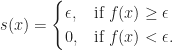
 . Thus
  . Dividing both sides by

 Mathtuition88