Best Calculator for Statistics

Best Calculator for Probability and Statistics

When it comes to statistical analysis, having the best calculator by your side is paramount. We have handpicked the top-rated calculators available on Amazon, specifically designed to meet the rigorous demands of statistical computations. These calculators combine advanced statistical functions, intuitive interfaces, and unparalleled precision, making them indispensable for any statistical enthusiast. Say goodbye to manual calculations and unlock your statistical mastery with these extraordinary calculators.

Best Casio Calculator for Statistics: Casio FX-991EX Scientific Calculator

The Casio FX-991EX Scientific Calculator is a statistical powerhouse. With over 500 built-in functions, including a wide range of statistical analyses, regression, probability, and hypothesis testing, this calculator offers unrivaled versatility. Its high-resolution display and intuitive interface make it a user-friendly tool for tackling complex statistical problems. Experience the precision and reliability of the Casio FX-991EX Scientific Calculator available on Amazon.

Casio FX-991EX Engineering/Scientific Calculator

Texas Instruments TI-34 Multiview Calculator for Statistics

The Texas Instruments TI-34 Multiview Calculator is an excellent choice for students and professionals looking for a compact yet powerful calculator for statistical analysis. With its four-line display and intuitive interface, this calculator allows for easy entry and review of multiple calculations simultaneously. It offers statistical functions, including mean, standard deviation, and regression, making it a versatile tool for basic to intermediate statistical analyses. Discover the Texas Instruments TI-34 Multiview Calculator on Amazon and simplify your statistical computations.

Texas Instruments TI-34 MultiView Scientific Calculator

Texas Instruments TI-84 Plus CE Graphing Calculator

The Texas Instruments TI-84 Plus CE Graphing Calculator is renowned for its robust graphing capabilities and advanced statistical functions. With its vibrant color display, customizable features, and extensive statistical analysis tools, this calculator is a favorite among students and professionals alike. Whether you need to perform regressions, analyze data sets, or visualize statistical concepts, the TI-84 Plus CE has you covered. Explore the Texas Instruments TI-84 Plus CE Graphing Calculator on Amazon and unlock your statistical prowess.

Texas Instruments TI-84 Plus CE Color Graphing Calculator

HP 10BII+ Financial Calculator

While not strictly a statistical calculator, the HP 10BII+ Financial Calculator is a reliable and affordable option for basic statistical calculations. It offers functions for mean, standard deviation, and linear regression, making it suitable for introductory statistical courses or quick calculations on the go. With its intuitive interface and compact design, the HP 10BII+ is a convenient choice for statistical calculations. Discover the HP 10BII+ Financial Calculator on Amazon and simplify your statistical analyses.

HP 10bII+ Financial Calculator

Best Statistical Calculators on the Market

Statistical enthusiasts, your search for the perfect calculator ends here! Explore our meticulously selected calculators, available on Amazon, and unlock your statistical mastery. Whether you’re a student embarking on statistical coursework, a researcher diving into data analysis, or a professional seeking to make data-driven decisions, these calculators will be your trusted ally. Embrace precision, power, and versatility with the Casio FX-991EX, Texas Instruments TI-84 Plus CE, and HP 10BII+ calculators and unleash your analytical prowess.

Best Calculator for Engineering

Best Calculator for Mechanical Engineering

Mechanical engineering involves intricate calculations, such as solving equations, analyzing forces, determining stresses and strains, and designing mechanical systems. A calculator streamlines these calculations, saving time and ensuring accuracy.

Texas Instruments TI-Nspire CX CAS: The Engineering Powerhouse

The Texas Instruments TI-Nspire CX CAS is an engineering marvel. This calculator combines raw power with advanced functionality, including a Computer Algebra System (CAS), enabling you to conquer complex equations with ease. With its vibrant color display, intuitive interface, and extensive graphing capabilities, this calculator is a must-have for any engineering enthusiast. Discover the TI-Nspire CX CAS on Amazon and unlock a world of engineering possibilities.

Texas Instruments TI-Nspire CX II CAS Color Graphing Calculator with Student Software (PC/Mac)

Casio FX-115ES PLUS: Precision and Versatility at Your Fingertips

When precision is paramount, the Casio FX-115ES PLUS shines. This scientific calculator boasts over 280 built-in functions, including advanced engineering calculations, matrices, and equation solving. Its Natural Textbook Display ensures easy comprehension of mathematical expressions, making it a trusted companion for engineering courses and professional endeavors. Explore the Casio FX-115ES PLUS on Amazon and experience the power of precision.

Casio fx-115ESPLUS2 2nd Edition, Advanced Scientific Calculator

Best Calculator for Electrical Engineering

Electrical engineers often deal with complex circuit analysis, involving calculations of voltage, current, resistance, power, and other electrical parameters. Calculators with advanced mathematical functions enable engineers to perform these calculations accurately and efficiently, simplifying circuit analysis and design.

HP 35s Scientific Calculator: Classic Design, Unparalleled Performance

Engineers who appreciate the elegance of classic calculators will find solace in the HP 35s Scientific Calculator. With its retro charm and robust functionality, this calculator offers a rich set of features, including engineering notation, 100+ built-in functions, and programmability. Experience the enduring legacy of HP calculators and explore the HP 35s Scientific Calculator on Amazon.

HP 35s Scientific Calculator

Sharp EL-W516TBSL Advanced Scientific Calculator: Your Engineering Ally on a Budget

Looking for affordability without compromising on functionality? Look no further than the Sharp EL-W516TBSL Advanced Scientific Calculator. Packed with features like statistical calculations, complex number operations, and equation solving, this calculator proves that excellence can be accessible to all. Discover the Sharp EL-W516TBSL on Amazon and experience the engineering prowess within your budget.

Sharp EL-W516TBSL 16-Digit Advanced Scientific Calculator

Conclusion

Engineers, your quest for the ultimate calculator ends here! With these meticulously selected Amazon offerings, you can fuel your engineering journey and elevate your mathematical genius to unprecedented heights. Harness the power of precision, versatility, and affordability with these exceptional calculators. Remember, greatness awaits those who dare to engineer their success. Seize this opportunity, explore the provided Amazon links, and claim your calculator companion today. Prepare to engineer a future brimming with triumph and mathematical brilliance!

Best Calculator for Linear Algebra and Calculus

Many universities and colleges allow students to use advanced graphical calculators for exams in math courses, including linear algebra, calculus and engineering. Having the appropriate calculator can prove to be a huge advantage in terms of getting the correct answer and saving time. Even if the handwritten manual working is required, a good calculator can help to check the correctness of the answer.

Best Calculator for Linear Algebra

The key calculations in linear algebra include calculating the inverse and determinant of matrices. Additional features that are useful in calculators include the ability to calculate eigenvalues, eigenvectors, and RREF (reduced row echelon form). These features can be great time savers (or at the minimum, useful tools for checking your answer), as matrix operations are often tedious and prone to human error.


Our first choice would be Texas Instruments TI-84 Plus CE Color Graphing Calculator, Black. This is one of the flagship calculators by Texas Instruments. This type of calculator is something like a smart phone, you would need to download free apps that will greatly magnify its power in solving Linear Algebra equations. Some of the linear algebra capabilities of the TI-84 Plus are:

  • Calculate adjoint of a matrix
  • Solve Simultaneous Equations
  • Calculate dot product, cross product of vectors
  • Calculate inverse of matrix (when matrix is invertible)
  • Calculate LDU decomposition, Cholesky factorization
  • Calculate Eigenvalues and plot the characteristic polynomial
  • Compute the Frobenius norm of a matrix
  • Perform Gram Schmidt orthonormalization
  • Calculate null space (kernel) if a matrix
  • and more!

This calculator is good enough up till senior undergraduate level or even graduate level, for computational intensive modules, such as computational physics or any module that requires linear algebra calculations.

For a more budget-friendly version, you may check out the Texas Instruments TI-84 Plus Graphing Calculator, Black which is essentially the black and white version of the TI-84 Plus CE Color.

Or for an even cheaper option, you could opt for the older version Texas Instruments TI-83 Plus Graphing Calculator which still supports the linear algebra apps.

Often, linear algebra courses include applications to differential equations as well, which overlaps with the next topic on Calculus.

Update: For the latest TI-85/86 models, there is a new “Matrix Mode” inbuilt into the calculator that can perform basic matrix operations (including inverse) and other advanced operations such as LU Decompositions, and finding eigenvalues/eigenvectors.

Note that paradoxically, the newer TI calculator models may be cheaper than the older ones.


Texas Instruments TI-86 ViewScreen Calculator

Best Calculator for Calculus

For Calculus, the important features that a calculator should have are the ability to perform numerical differentiation and integration. There are also some amazing apps for TI83/84 that can perform symbolic differentiation, that is, find the derivative of a function in symbols (not just the numerical value at certain values of x).

So once again, the TI-84 Plus CE Color Graphing Calculator, White is a good suggested calculator for Calculus modules.

If your budget (and course requirements) permit, you should definitely check out the Texas Instruments TI-Nspire CX II CAS Color Graphing Calculator with Student Software (PC/Mac). CAS stands for “computer algebra system”, which means that the calculator is capable of producing symbolic results rather than just numerical results.

The TI-Nspire™ CX II features a deSolve wizard function for reducing syntax errors in solving differential equations. The TI-Nspire CX can even do vector calculus. It is a very powerful smart calculator that is essentially a mini-computer.

TI Calculator Alternatives

In my experience as a student and educator, TI (Texas Instruments) calculators dominate the market and are generally considered a good choice. But there are other viable alternatives that can also be considered good for linear algebra, calculus or engineering math.

A popular alternative is Casio calculators, for instance Casio fx-9750GII Graphing Calculator with icon based menu. Color white. An immediate advantage of Casio calculators is their low price.

The Casio fx-9750 (and related series) calculator is able to calculate determinant of matrix as well as basic matrix operations such as multiplying matrices, finding the inverse of matrix, etc.

As mentioned above, the main advantage of Casio graphical calculators is their low price. For advanced features, the TI calculators definitely trump over the Casio calculators.

Another alternative to TI calculators are the HP graphical calculators. Let us check out the most powerful HP calculator, the HP 50g Graphing Calculator.

The HP 50g Graphing Calculator has a “MatrixWriter form” to facilitate the entry of matrices. It is essentially like an Excel spreadsheet. Once the matrix is entered, there is a myriad of functions that can be applied, such as finding the determinant, trace, transpose, and rank of a matrix.

In terms of Calculus, the HP 50g can perform a wide range of calculus functions such as:

  • Limits and derivatives
  • Anti-derivatives and Integrals
  • Calculate the Taylor/Maclaurin series of a function symbolically (up to 4-th order relative power, i.e., the difference between the highest and lowest power in the expansion is 4)
  • Partial Derivatives (Multivariate Calculus)
  • Multiple Integrals such as double integral
  • Vector Calculus such as del, gradient, divergence, curl
  • Differential Equations
  • Fourier series

The list above is quite impressive! Overall, the HP 50g Graphical Calculator is a very strong competitor to the TI series graphical calculators.

Best Calculator for Engineering

Engineers often need to use Linear Algebra, as well as Calculus. Hence, the best calculator for engineering often overlaps with the best calculator for linear algebra or calculus. Do check out our above reviews and pick the calculator that best suits your needs.

In general, we have the below summary.

Best Budget Calculator: Casio graphical calculators, such as Casio fx-9750GII Graphing Calculator with icon based menu. Color white.

Safe choice, all-round best calculator: TI Texas Instruments Calculator, for instance the iconic Texas Instruments TI-84 Plus CE Color Graphing Calculator, Black

Super Powerful Calculator (very advanced and comprehensive features): HP 50g Graphing Calculator

Indian bride walks out of wedding when groom fails math test

Source: https://sg.news.yahoo.com/groom-fails-math-test-indian-bride-walks-wedding-065433753.html

Here’s one more reason to learn math!

NEW DELHI (AP) — An Indian bride walked out of her wedding ceremony after the groom failed to solve a simple math problem, police said Friday.

The bride tested the groom on his math skills and when he got the sum wrong, she walked out.

The question she asked: How much is 15 plus six?

His reply: 17.

The news may seem like a joke, but on a more serious note, the usage of calculators in Primary 5 & Primary 6 has led to a drop in the mental arithmetic standards of children in Singapore! As a tutor, I have clearly observed the difference before and after the calculator usage was introduced. Many a times, students need a calculator to calculate what is 18+15, for example. Also, 8 times 8 (mental calculation) would pose a challenge nowadays to some students ages 9-12, whereas in the past students would know it is 64 in less than a second.

What is happening is that students are getting a bit too reliant on the calculator, and hence their human calculator (a.k.a brain) has lack of training in this aspect. How to remedy it is to practice and train in more multiplication questions.


How to Remember Trigonometric Special Angles easily using Calculator

How to Remember Special Angles easily using Calculator

Step 1: Type the expression into calculator, eg. \sin (\frac{\pi}{3}) (in radian mode, for this case)

Step 2: You will get 0.8660254038. Square the Answer. (Ans^2)

Step 3: You will get 3/4. That means \sin (\frac{\pi}{3})=\frac{\sqrt{3}}{2}

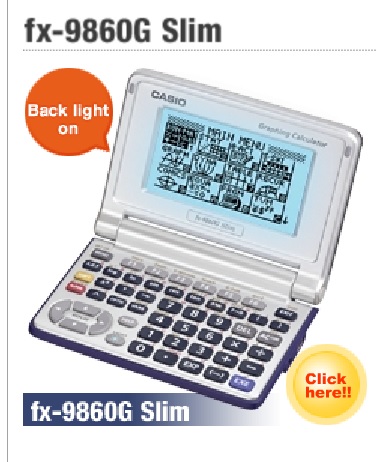
How to use tables in CASIO FX-9860G Slim (H2 Maths Tuition)

Tables in CASIO FX-9860G Slim

The most popular Graphical Calculator for H2 Maths is currently the TI-84 PLUS series, but some students do use Casio Graphical Calculators.

The manual for CASIO FX-9860G Slim is can be found here:

http://edu.casio.com/products/fx9860g2/data/fx-9860GII_Soft_E.pdf

The information about Tables and how to generate a table is on page 121.

Generating tables is useful to solve some questions in sequences and series, and also probability. It makes guess and check questions much faster to solve.

h2 tuition gc
Picture of the CASIO FX-9860G Slim Calculator