
Today I had a bad shock when my trusted TI-84 Plus Pocket SE Calculator could not be turned on. I just purchased it last year, and TI-84 Calculators are not exactly cheap as every JC student in Singapore would know.
On Amazon, the Texas Instruments TI-84 Plus Silver Edition Graphing Calculator, Silver

How to Repair the TI-84 (Cannot even switch on)
First, I did the common sense approach of changing all the AAA and even the button LR44 battery. No luck…
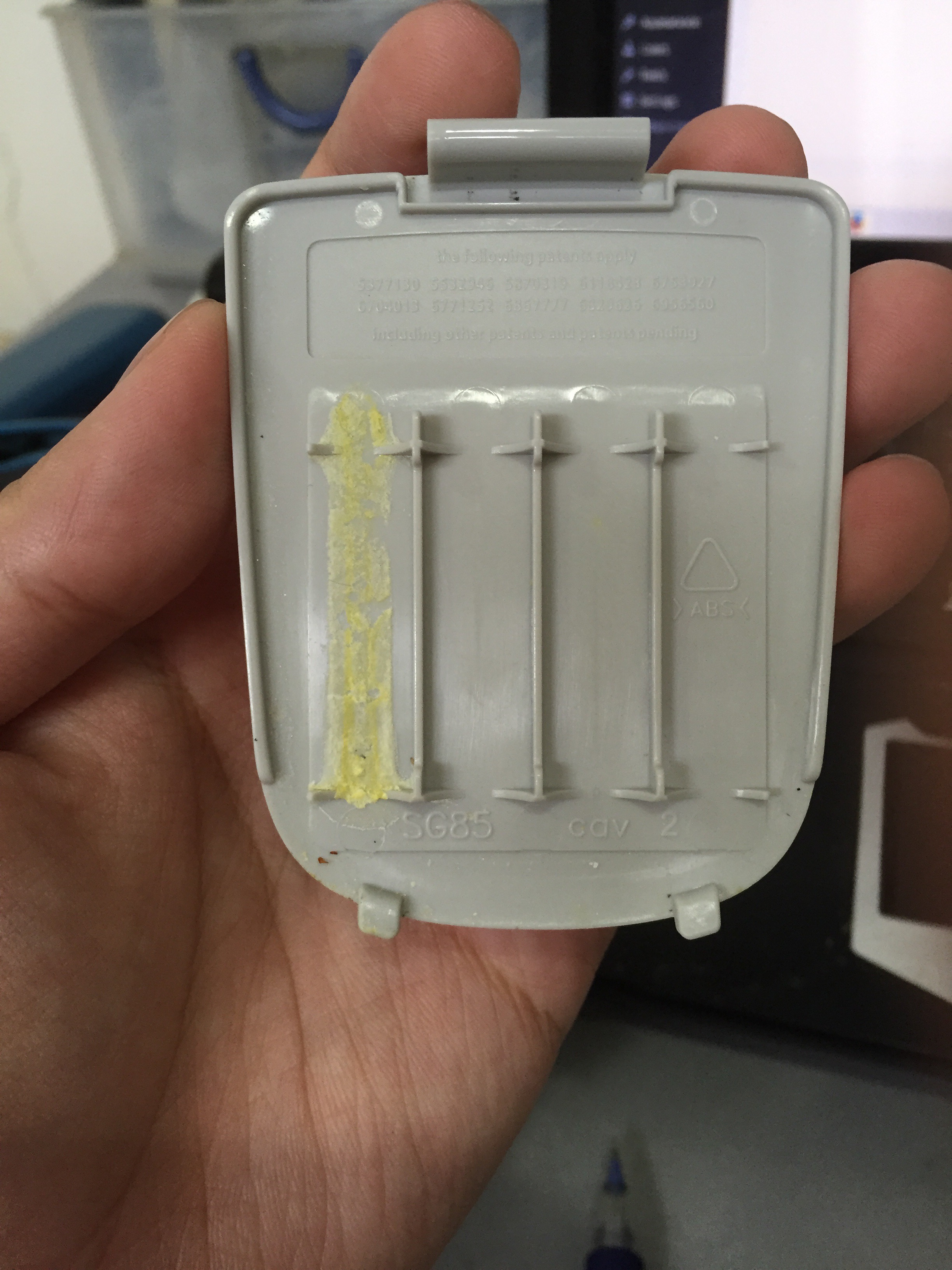
I noticed something strange happened to one of the batteries. A layer of yellow crust has coated the battery case. (I was using Ikea batteries)
I followed the 5 steps I found on the TI-84 troubleshooting site:
- Try a new set of AAA batteries.
- Adjust the contrast by pressing and releasing [2ND] followed by pressing and releasing [▲]; repeat as necessary. To adjust or lighten the display, use the down arrow.
- Remove one of the AAA batteries. Press and hold [CLEAR]. While holding [CLEAR], reinsert the AAA battery and press [ON]. The calculator should display the message “RAM Cleared“. Release [CLEAR] and then press it one more time to remove the message.
- Remove one of the AAA batteries. Press and hold [DEL]. While holding [DEL], reinsert the AAA battery and then press [ON]. The calculator should display “Waiting…Please install calculator software now“. Follow the instructions for the TI-83 family or TI-84 Plus family to reinstall the calculator operating system.
- Remove all of the batteries including the round lithium battery for 5 minutes. After the 5 minute period, reinsert all of the batteries and turn the calculator on. Adjust the contrast if necessary.
After trying all the 5 steps, I still couldn’t get the TI-84 to switch on.
I then used a piece of tissue to wipe of the battery contacts which were coated with the battery leak. Then, I tried step 5 again.
Thank God, the TI-84 sprung back to life again, and I can save $200 for now…
H2 Math Condensed Notes
For those taking H2 Maths, do check out my H2 Maths Condensed Notes with Bundled Prelim Papers!

 Mathtuition88
I’m glad that this doesn’t happen to me yet 🙂
But it’s still a good info in case this happens to me.
LikeLiked by 2 people
I have a feeling it has something to do with Singapore’s humidity. Hope your TI-84 stays healthy!
LikeLiked by 2 people
Yeah, humidity can destroy the best electronic products…
LikeLike
Thank you so much for this!!!! It worked like magic!! I thought I was going to have to buy a new calculator!! Thank you!
LikeLiked by 1 person
I am glad it helps! Please share this with your other friends who have this graphic calculator 🙂
LikeLike